Redis Caching in .NET with IDistributedCache, HybridCache and Atomic TTLs


Caching is simple: store a value, give it a lifetime, read it back. The part you can't see is the lifetime. If a value is written with one command and its expiry is set with a second, a dropped connection or a concurrent write between the two leaves a key with the wrong expiry, or none at all:
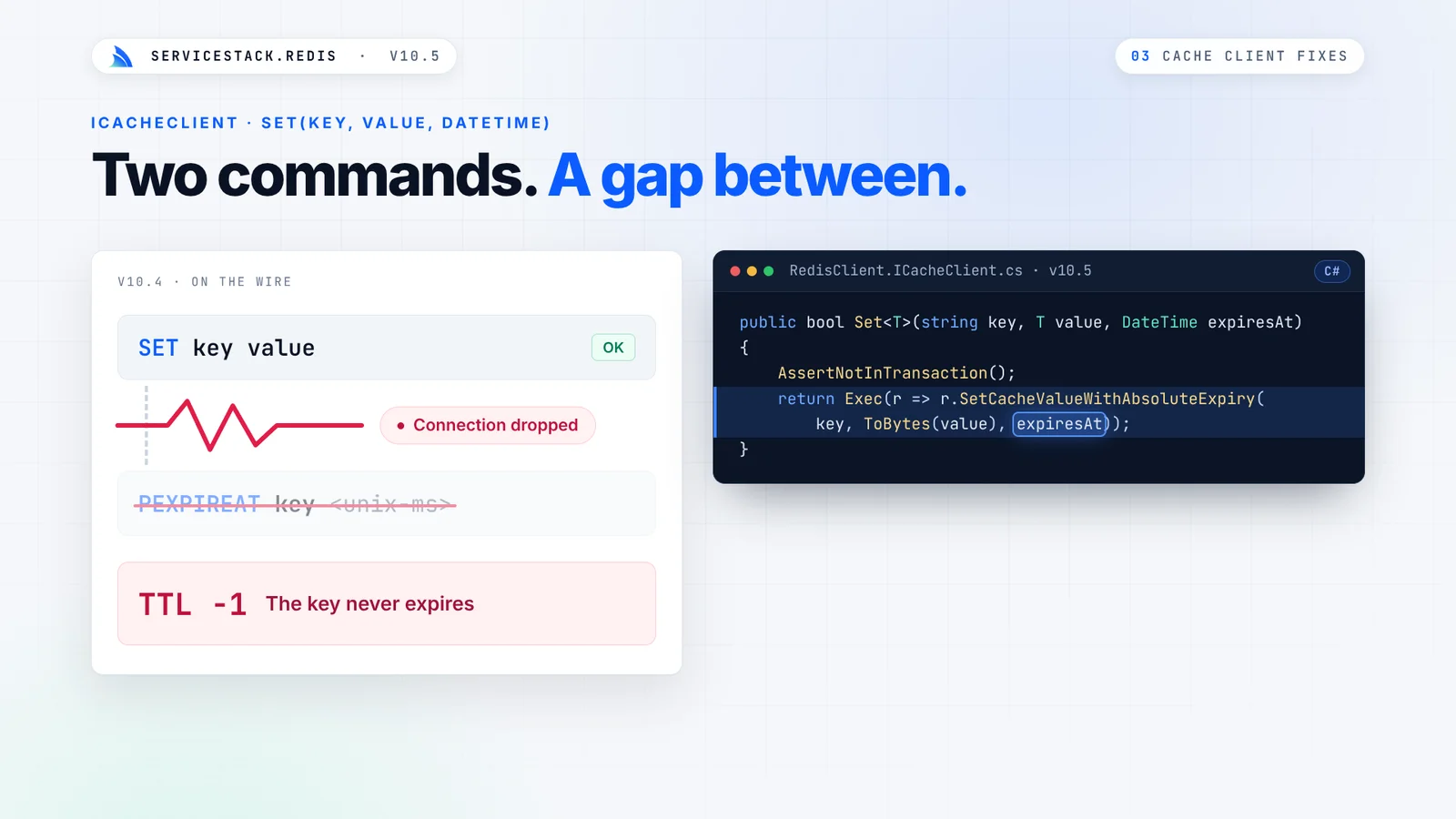
Nothing throws. Your App keeps working while it serves stale data, or slowly fills Redis with keys that never expire.
ServiceStack.Redis v10.5 closes that gap. Every value and its expiry are written together in one atomic step, and on .NET 10 that same guarantee now sits behind Microsoft's standard caching APIs.
Your Redis behind IDistributedCache
On .NET 10, ServiceStack.Redis can back Microsoft's IDistributedCache, so ASP.NET Core features and libraries
that use the standard caching abstractions store their data in your Redis with one call:
builder.Services.AddServiceStackRedisCache("localhost:6379", options => {
    options.KeyPrefix = "myapp:cache:v1:";
});
If you already register an IRedisClientsManager, the cache reuses its connection pool instead of opening another:
builder.Services.AddSingleton<IRedisClientsManager>(c => new RedisManagerPool("localhost:6379"));
builder.Services.AddServiceStackRedisCache();
There's no extra package to install. The adapter and its Microsoft dependencies are only included in the net10.0
build of ServiceStack.Redis, so Apps on net472, net6.0 and net8.0 don't take on any new dependencies. Values
are stored as raw bytes, so empty values are kept as they are.
The L2 behind HybridCache
It also works as the distributed L2 cache for Microsoft's HybridCache:
builder.Services.AddServiceStackRedisCache("localhost:6379");
builder.Services.AddHybridCache();
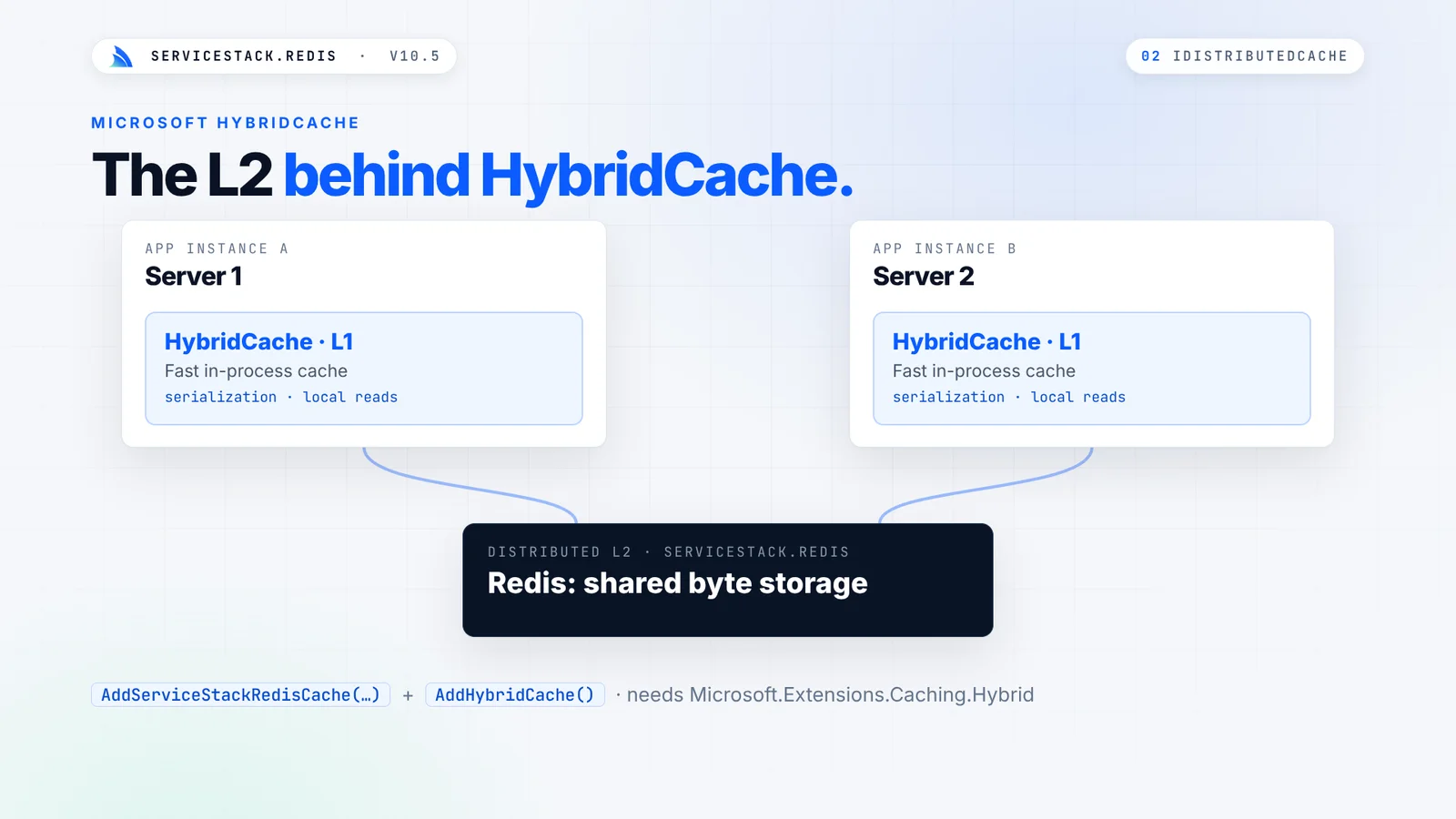
HybridCache handles serialization and the fast in-process L1 inside each server, whilst Redis provides the shared L2 byte storage. Each server's L1 is independent, and there's no invalidation backplane between them, so choose L1 lifetimes you're happy to serve.
Absolute and sliding expiration, enforced together
IDistributedCache supports an absolute deadline and a sliding window that extends on every read. When you use both,
the window must stop at the deadline. ServiceStack.Redis runs Set, Get and Refresh as single Lua scripts that
check the value, the sliding window and the absolute deadline together, so a concurrent refresh can never push an
entry past its absolute expiration:
await cache.SetStringAsync("status", "ready", new DistributedCacheEntryOptions {
    AbsoluteExpirationRelativeToNow = TimeSpan.FromMinutes(10),
    SlidingExpiration = TimeSpan.FromMinutes(2)
}, token);
The scripts are cached on the server and run by their SHA1 hash, so each call sends only its arguments. It requires
Redis 5+ (or Valkey) with permission to run EVAL and EVALSHA.
Expiries you already set, fixed
If you use ServiceStack's ICacheClient, v10.5 fixes expiry issues you might not have known you had:
Set,AddandReplacewith aDateTimewrote the value, then sent a separate command to set its expiry. They now send oneSET key value PXAT <unix-ms>on Redis 6.2+, and one atomic Lua script on older servers.- Async
AddAsyncandReplaceAsyncwith aTimeSpandidn't pass their expiry to Redis at all, so those keys were stored without a TTL. They now set it the same way as their sync versions.
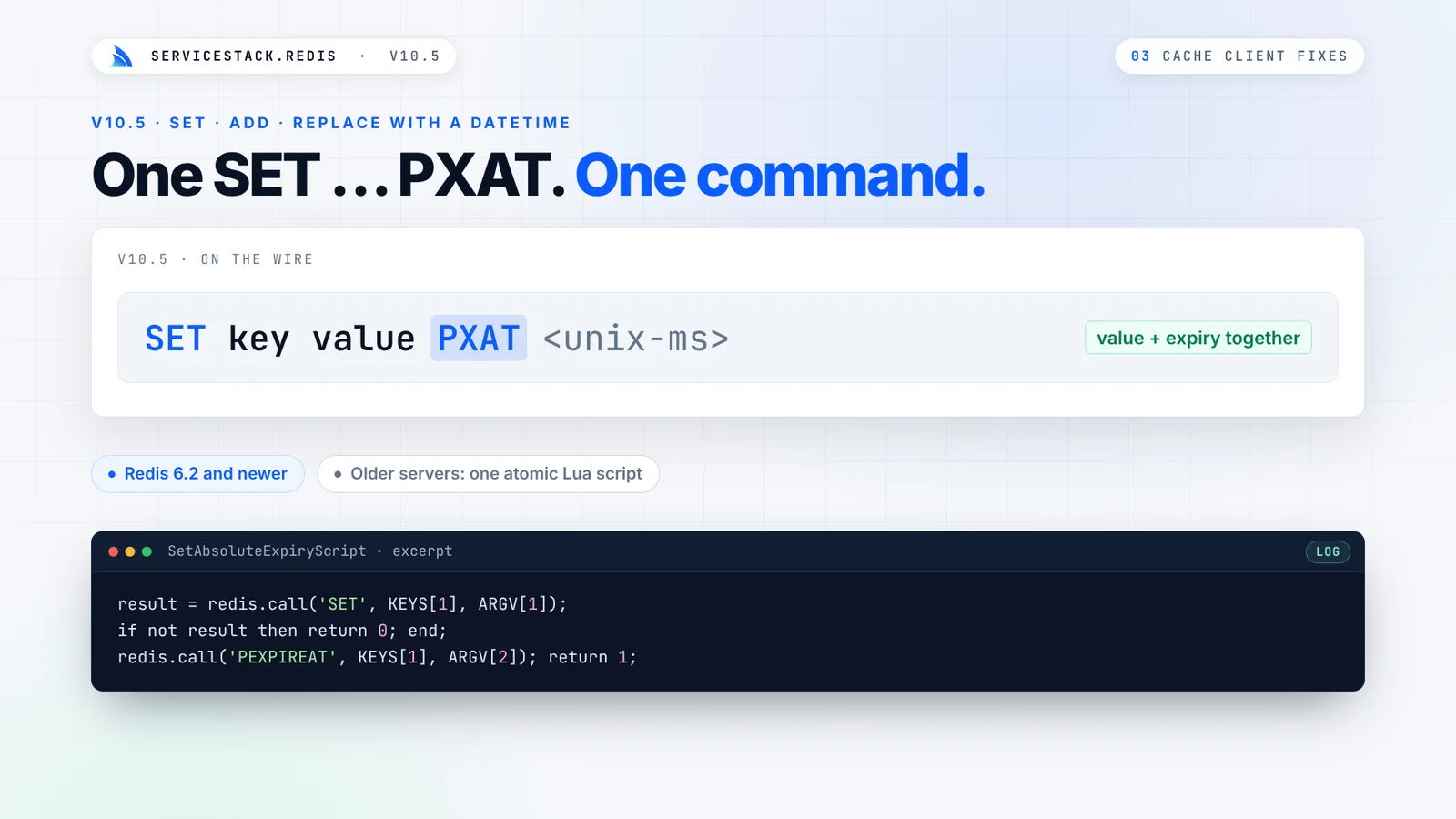
There's nothing to change in your code to get the fix: the same calls now apply their expiries atomically.
Read and expire, read and delete
Reading a session and extending its lifetime usually takes two round trips, and redeeming a one-time token with a read and then a delete leaves a gap where two requests can both redeem it. v10.5 adds Redis's atomic key commands:
| API | Redis Command | Description |
|---|---|---|
GetAndExpireValue |
GETEX |
Return a value and update its expiration in one command |
GetAndDeleteValue |
GETDEL |
Return a value and delete it in one command |
Unlink |
UNLINK |
Remove keys immediately, freeing their memory in the background |
using var redis = redisManager.GetClient();

// Sliding sessions: read it and push its expiry back in one command
string session = redis.GetAndExpireValue("session:1", new RedisGetExOptions { ExpirySeconds = 20 * 60 });

// One-time tokens: only one request can ever get the value
string token = redis.GetAndDeleteValue("one-time-token:1");
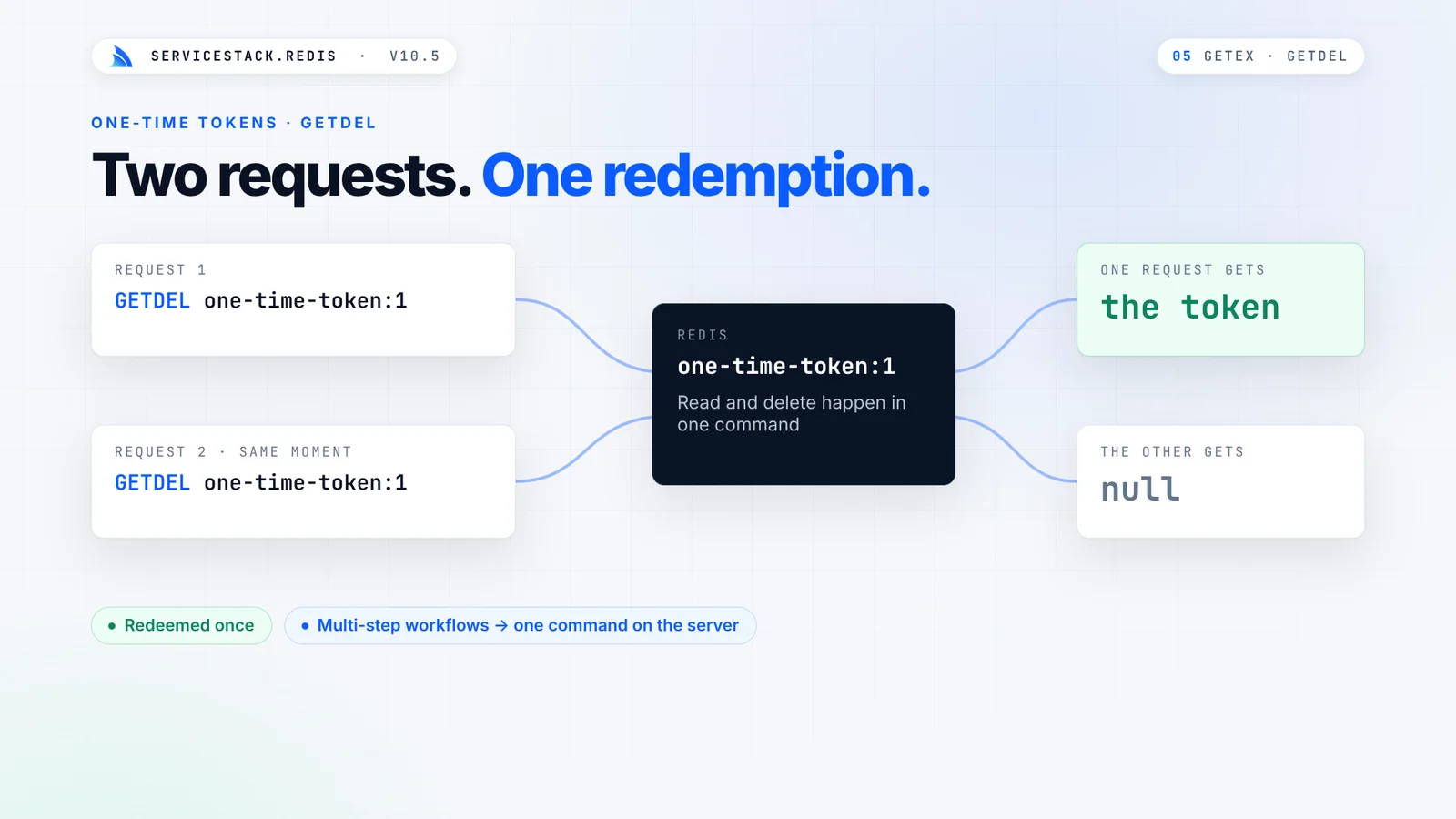
Even if two identical requests reach Redis at the same millisecond, GETDEL guarantees only one of them gets the
token. GETEX and GETDEL require Redis 6.2+.
Clear large keys and patterns without stalling Redis
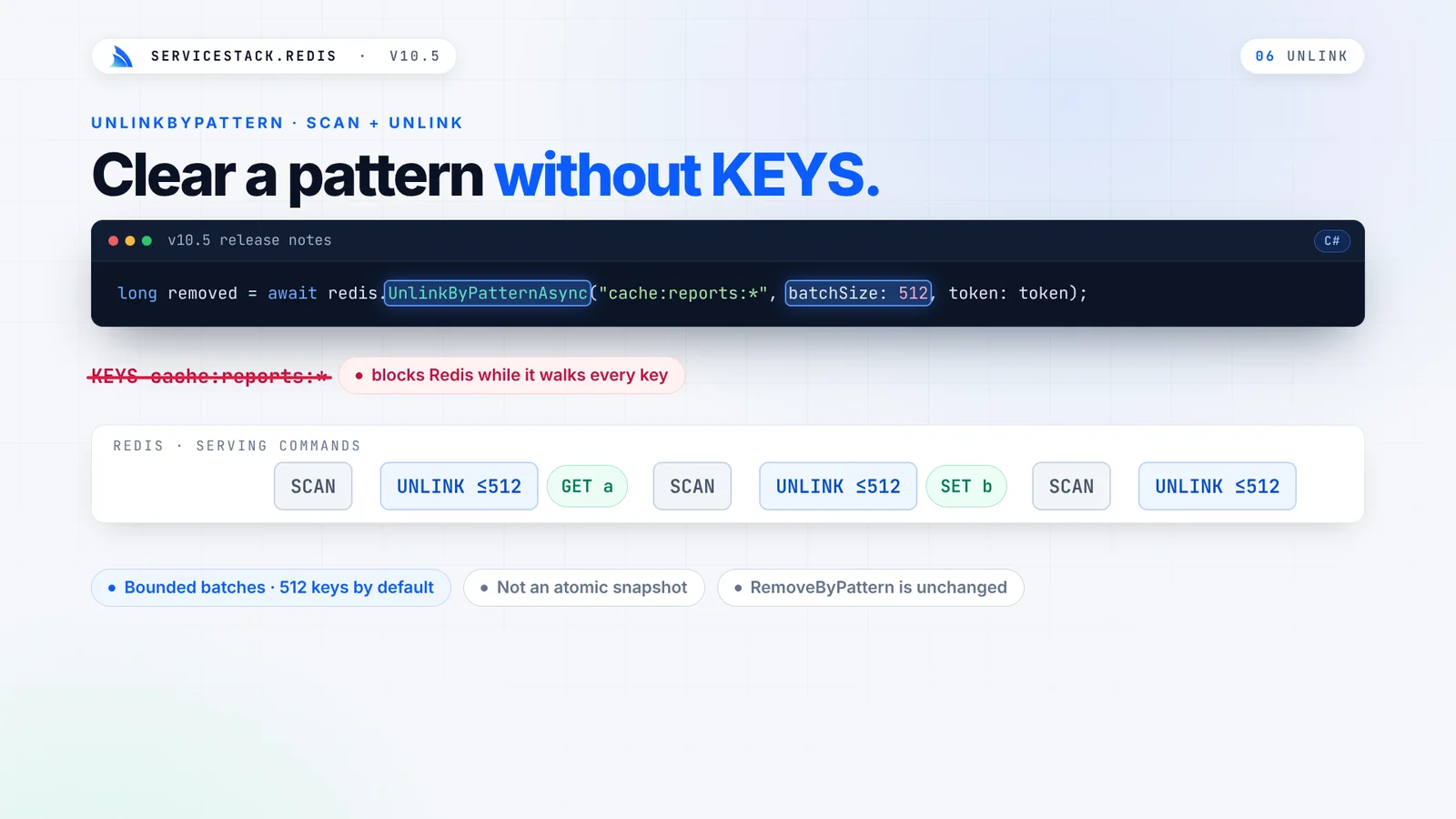
Deleting a large key with DEL blocks Redis's main thread while it frees the memory, so every other client waits.
Unlink removes the key from the keyspace immediately and reclaims its memory in the background:
long removed = redis.Unlink("large:key", "another:key");
To clear every key matching a pattern, the new UnlinkByPattern walks the keyspace with a SCAN cursor instead of
the blocking KEYS command, and removes what it finds in bounded UNLINK batches, so other clients' commands keep
running in between:
long removed = await redis.UnlinkByPatternAsync("cache:reports:*", batchSize: 512, token: token);
Expire a single field in a hash
Hashes keep related values together under one key, like a user's profile. Until Redis 7.4, every field in a hash shared the key's lifetime. On Redis 7.4+ or Valkey 9+, each field can now expire on its own schedule:
await redis.SetEntryInHashAsync("users:42", "presence", "online", token);

long[] results = await redis.HPExpireAsync("users:42", 30_000,
    new[] { "presence", "missing" }, RedisHashExpiryCondition.NX, token);
// [1, -2]: "presence" now expires in 30s, "missing" doesn't exist
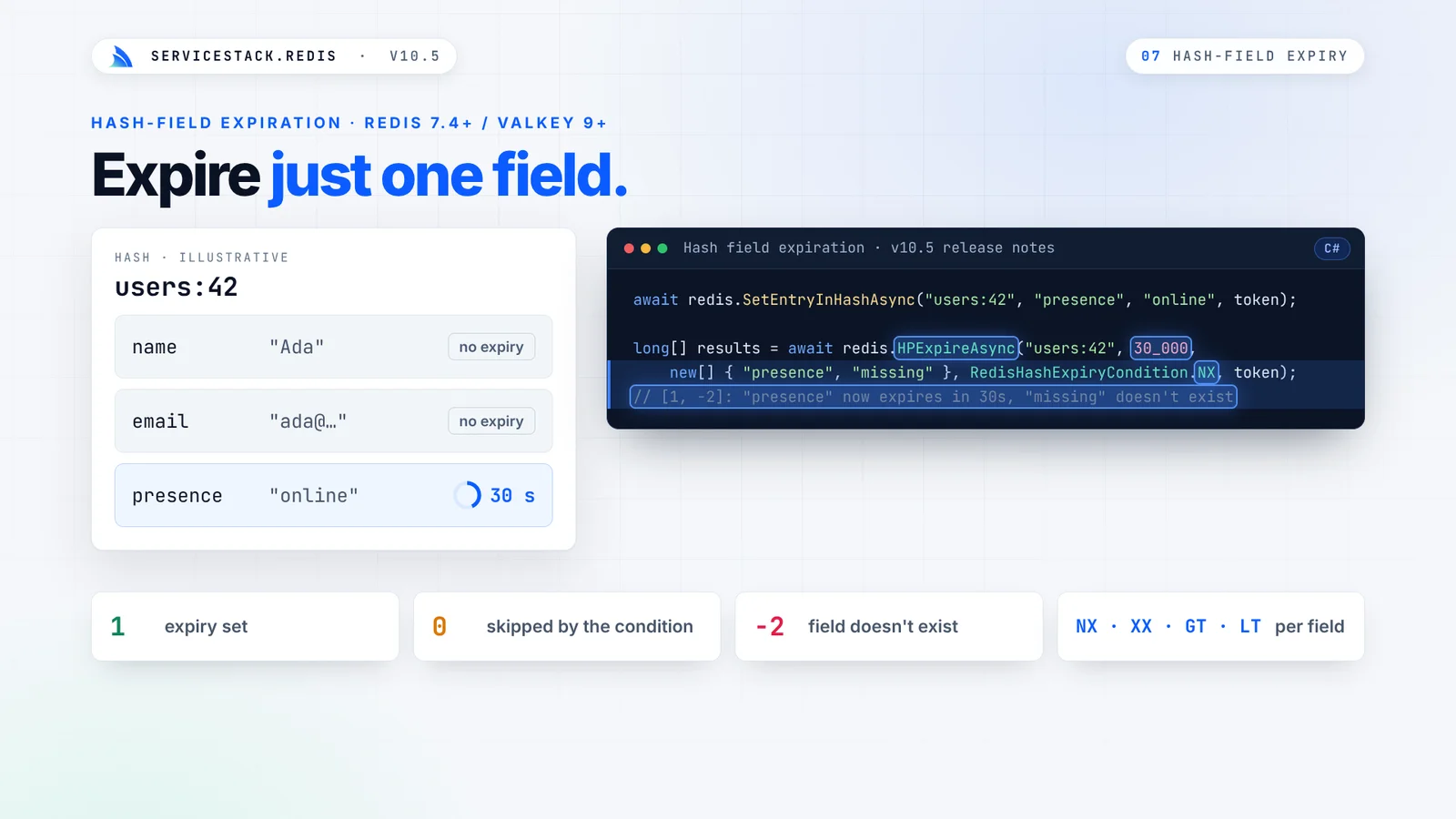
The user's name and email stay, whilst their online presence expires 30 seconds after their last heartbeat. Each call
returns one status code per field, so you can tell which were updated, which were missing and which were skipped by an
NX, XX, GT or LT condition, and expiring a field never changes the lifetime of the hash itself.
That's all it takes to show who's online in a chat room, with each member disappearing on their own when their heartbeats stop:
public void Heartbeat(string room, string userId, TimeSpan ttl)
{
    redis.SetEntryInHash(room, userId, DateTime.UtcNow.ToString("O"));
    redis.HPExpire(room, (long)ttl.TotalMilliseconds, new[] { userId });
}

List<string> online = redis.GetHashKeys("presence:room:42");
Absolute expiry suits access that ends at a known time, like a 14-day trial feature, where the GT condition makes
sure an extension can never cut an existing grant short:
redis.SetEntryInHash($"grants:user:{userId}", "export-reports", "trial");
redis.HExpireAt($"grants:user:{userId}", DateTimeOffset.UtcNow.AddDays(14).ToUnixTimeSeconds(),
    new[] { "export-reports" }, RedisHashExpiryCondition.GT);
Patterns for a cache that stays fast
Alongside v10.5 we've added new Redis Use-Cases docs, with tested recipes for common problems. Three from Caching Patterns build directly on atomic expiry.
Stop cache stampedes
When a popular key expires, every request that misses at the same moment rebuilds the value, and a query that
normally runs once runs hundreds of times at once. Let only one caller rebuild it, using an atomic SET NX with an
expiry as a short-lived lock:
public static T GetOrCreateOnce<T>(this IRedisClient redis, string key, TimeSpan expireIn,
    Func<T> createFn, TimeSpan? waitFor = null) where T : class
{
    var value = redis.Get<T>(key);
    if (value != null) return value;

    var lockKey = key + ":rebuilding";
    var waitUntil = DateTime.UtcNow + (waitFor ?? TimeSpan.FromSeconds(5));
    while (DateTime.UtcNow < waitUntil)
    {
        // Only the caller that creates the lock key rebuilds the value
        if (redis.SetValueIfNotExists(lockKey, "1", TimeSpan.FromSeconds(30)))
        {
            try
            {
                value = createFn();
                redis.Set(key, value, expireIn);
                return value;
            }
            finally
            {
                redis.RemoveEntry(lockKey);
            }
        }

        Thread.Sleep(50); // Everyone else waits for the rebuilt value
        value = redis.Get<T>(key);
        if (value != null) return value;
    }
    return createFn(); // The rebuild is taking too long, fall back to loading it ourselves
}
In our tests, 20 concurrent callers hitting an expired key ran the rebuild exactly once, and all 20 received the rebuilt value.
Invalidate related entries together
Record each cached key in a Redis Set for each tag it belongs to, then remove a whole group atomically with a small
Lua script that UNLINKs its members:
const string InvalidateTagLua = """
    local keys = redis.call('SMEMBERS', KEYS[1])
    for i = 1, #keys, 500 do
        redis.call('UNLINK', unpack(keys, i, math.min(i + 499, #keys)))
    end
    redis.call('UNLINK', KEYS[1])
    return #keys
    """;

redis.ExecLuaAsInt(InvalidateTagLua, new[] { "tag:category:tools" }, Array.Empty<string>());
When a whole namespace goes stale at once, such as after a catalog import, put a generation number in each key and
invalidate everything with a single INCR, letting the old entries expire on their own.
A two-tier cache across servers
For small, very hot values, keep a short-lived copy in each server's memory and use Redis Pub/Sub to tell every server
to evict its copy when the value changes. The two-tier cache recipe
combines a MemoryCacheClient, Redis and a managed RedisPubSubServer in one class.
Distributed rate limiting with the same guarantee
The same gap that loses cache expiries also breaks naive rate limiting. INCR a counter, then EXPIRE it, and a
process that dies between the two leaves a counter that never resets, locking that caller out until someone deletes
the key. Running both in one Lua script makes them atomic:
public const string FixedWindowLua = """
    local count = redis.call('INCR', KEYS[1])
    if count == 1 then
        redis.call('PEXPIRE', KEYS[1], ARGV[1])
    end
    return count
    """;
ASP.NET Core's rate limiting keeps its counters in each server's memory, so behind a load balancer every server enforces its own limit. With the counters in Redis, a limit of 100 requests a minute means 100 in total, however many servers handle them. A global request filter applies it to every ServiceStack API:
appHost.GlobalRequestFiltersAsync.Add(async (req, res, requestDto) =>
{
    var redisManager = req.TryResolve<IRedisClientsManagerAsync>();
    await using var redis = await redisManager.GetClientAsync();

    var session = await req.GetSessionAsync();
    var caller = session.IsAuthenticated ? $"user:{session.UserAuthId}" : $"ip:{req.RemoteIp}";
    var key = $"ratelimit:{requestDto.GetType().Name}:{caller}";

    var count = await redis.ExecLuaAsIntAsync(FixedWindowLua, new[] { key }, new[] { "60000" });
    if (count > 100)
    {
        res.AddHeader("Retry-After", "60");
        throw new HttpError(429, "TooManyRequests", "Rate limit exceeded, try again later");
    }
});
Distributed Rate Limiting also covers sliding windows for exact limits on logins and password resets, and token buckets that allow short bursts.
One change to check before upgrading
All new APIs are additive, and there's one behavior change to check. Reading an empty string in a pipeline or
transaction now returns "" instead of null, matching what the same call returns outside a pipeline:
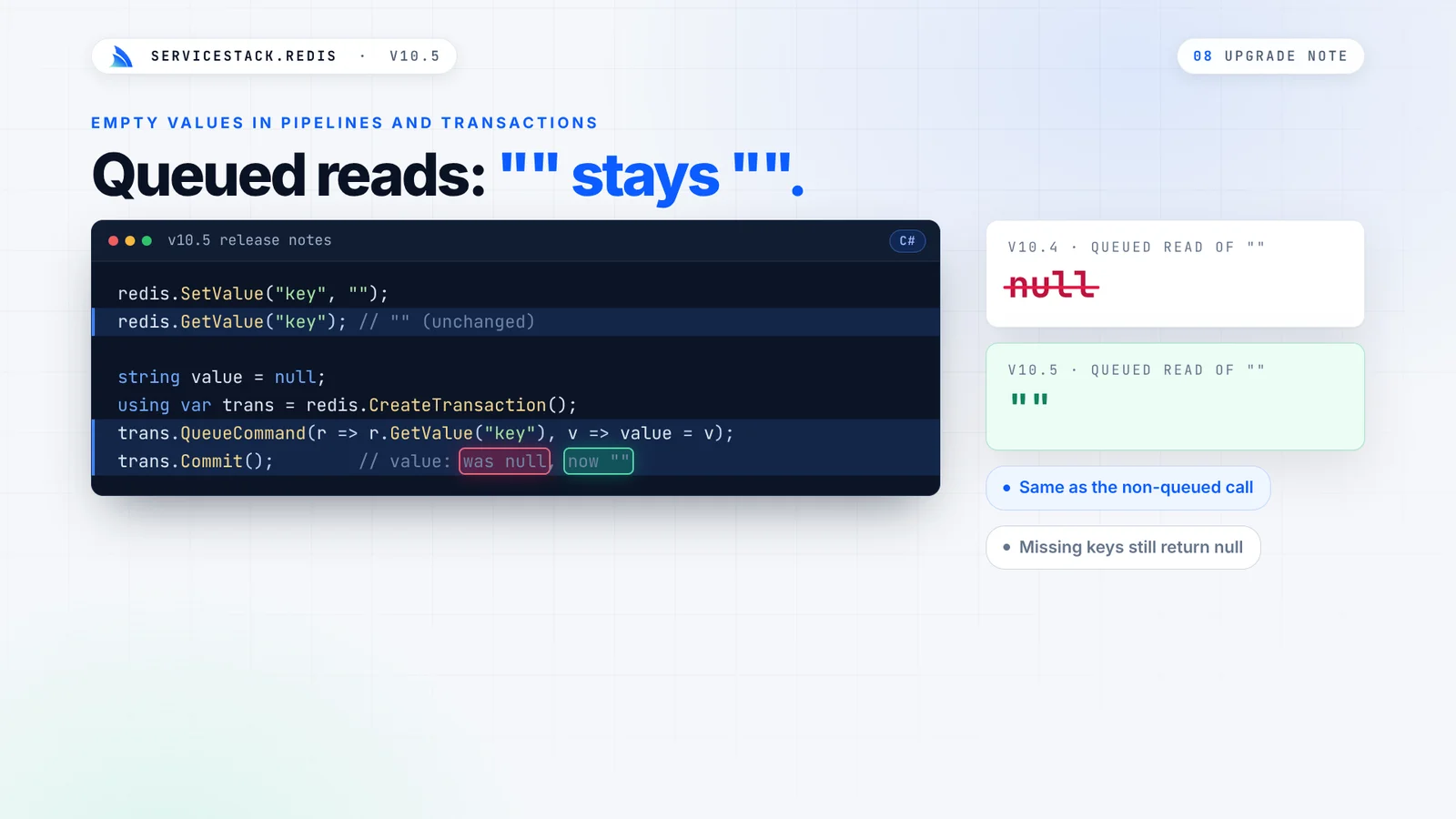
If you check queued results with value == null, switch to string.IsNullOrEmpty(value). Missing keys still return
null. To keep the old behavior while you review your code, set this at startup:
RedisConfig.PipelineEmptyValuesAsNull = true;
Upgrade today
With v10.5 your Redis serves both ServiceStack's cache and ASP.NET Core's caching APIs, with expiries that do what you set even under concurrency and dropped connections. See the docs for the details:


