Richer APIs and Auto UIs with API Schemas


Every API now comes with its own UI
Open /schema in any .NET 8+ ServiceStack App and you'll find a searchable index of every API the signed-in user can call. Open one and you get a working UI for it — form, validation, request preview, curl command, execution and response — with no code written and nothing installed.
The page isn't special. It fetches one small JSON document and hands it to a generic component:
<script setup lang="ts">
import { ref, onMounted } from 'vue'
import { ApiFormSchema } from '@servicestack/vue'

const schema = ref()
onMounted(async () =>
    schema.value = await fetch('/schema/CreateCoffeeShopOrder.json').then(r => r.json()))
</script>

<template>
  <ApiFormSchema v-if="schema" :schema="schema" />
</template>
That's the whole integration — for that API, and every other one. The component never learns anything about CreateCoffeeShopOrder; the fetched schema supplies the fields, controls, validation, HTTP method and execution URL.
It is also what lets AI Chat render a trustworthy approval form for any API a Model proposes calling, without anyone building a Chat component per Request DTO.
ServiceStack has always treated your typed Request and Response DTOs as the source of truth for your APIs. From those types it can generate routes, metadata, validation, native client DTOs, API Explorer forms and OpenAPI specifications without requiring developers to maintain parallel descriptions of the same service. The new built-in API Schema support takes that philosophy further: the description is now portable, per-API, and enough on its own to build a UI from.
These routes are registered with the existing Metadata feature and require no separate schema plugin or frontend project.
{HTTP Method} /api/{RequestDto}
GET /schema/{RequestDto}.json
One contract connects execution and presentation
These endpoints are natural complements. /api/{RequestDto} executes the API; /schema/{RequestDto}.json explains how to use it. The schema carries the API's fields, nested types, validation, authorization requirements, HTTP method and an $id that points back to its /api/{RequestDto} execution URL.
That relationship is what makes the approach so elegant: fetch one small schema and pass it to the generic ApiFormSchema component. The component can render the inputs, preview the HTTP request and curl command, invoke the API and display its response. The same component works for any Request DTO, so adding another API does not require adding another hand-built screen.
From machine-readable schema to executable UI
Remove .json and the same endpoint becomes a complete, executable UI:
It renders a responsive form for the API, selects suitable controls for every property, validates user input, shows the exact HTTP request it will send, generates a copyable curl command, invokes the API and displays its response.
No application UI needs to be written. No OpenAPI client needs to be installed. No separate schema needs to be maintained.
Your existing ServiceStack metadata contains everything needed to describe both the API contract and a high-quality UI for using it.
Browse every API at /schema
Open /schema in a ServiceStack App to see every API available to the current user.
The built-in API browser provides a fast searchable launcher designed for large applications. APIs can be filtered by name, description, tag and HTTP verb, with fuzzy matching that understands the PascalCase names used by Request DTOs.
Each entry shows the API's name, purpose, route, verb and tags. Authorization requirements are surfaced without exposing APIs the current session is not allowed to discover.
The browser is useful throughout an application's lifecycle:
- Developers can explore an unfamiliar codebase without searching for Service classes.
- Frontend developers can inspect and invoke APIs before their production UI exists.
- Testers can reproduce requests and validation errors without writing a client.
- Support teams can use approved operational APIs directly.
- API designers can immediately see whether descriptions and validation produce a clear user experience.
- AI developers can inspect the exact schemas made available to Models and approval forms.
Because the page is generated at runtime, it always reflects the application that is actually deployed.
JSON when you need a contract, HTML when you need an App
The schema routes use ordinary HTTP content negotiation, with convenient .json URLs for clients and tools:
The collection endpoint returns a compact catalog of APIs available to the caller. The detail endpoint returns the complete schema for one Request DTO.
Open the same routes without .json in a browser:
and ServiceStack serves their full interactive UI.
This pairing is deliberately simple. The machine-readable contract and the human-readable application are two views over the same metadata. A developer, automation tool or AI Model can consume JSON; a person can open the adjacent URL and use it immediately.
More than a type definition
The schema is based on JSON Schema Draft-07, but it describes more than the structural shape of a DTO. It carries the API's route and HTTP method, its titles and descriptions, required fields, validation constraints, allowable values, authorization requirements and UI hints for controls, help text, lookups, uploads and formatting — enough to construct and invoke the API without loading ServiceStack's full application metadata document.
For example, a generated schema can look like:
{
  "$schema": "http://json-schema.org/draft-07/schema#",
  "$id": "/api/CreateCoffeeShopOrder",
  "request": "CreateCoffeeShopOrder",
  "method": "POST",
  "title": "Submit a Coffee Shop Order",
  "description": "Submits a validated coffee shop order",
  "type": "object",
  "required": ["CustomerName", "Items"],
  "properties": {
    "CustomerName": {
      "type": "string",
      "title": "Name to put on the order"
    },
    "Items": {
      "type": "array",
      "title": "Final order items",
      "items": {
        "type": "object",
        "properties": {
          "ProductId": { "type": "integer", "minimum": 1 },
          "Quantity": { "type": "integer", "minimum": 1 }
        }
      }
    }
  },
  "ui": {
    "submitLabel": "Create Coffee Shop Order"
  }
}
Compact enough to retrieve on demand, expressive enough to power an independent client. The API Schema docs document every key in full.
Built to scale beyond thousands of APIs
The cost of loading everything up front
ServiceStack's API Explorer at /ui loads the full MetadataApp document from /metadata/app.json — every operation, DTO, data model and related type — before it can show you one API. That is convenient at smaller scales and increasingly expensive at larger ones: the browser downloads, parses and retains metadata for the entire application to render a single form.
For customers with the largest API surfaces this eventually became a hard ceiling. Applications with 1,000+ APIs could hit JavaScript engine limits during initialization, preventing API Explorer from loading at all — the teams who most needed a way to explore their APIs were the ones who couldn't. Those Apps now get a working, searchable UI for every one of their APIs, because nothing has to load the whole application to render one form.
Load one focused schema at a time
API Schemas invert that dependency:
The catalog contains enough information to search and select an API. Opening an API loads only the schema required to render and invoke that operation. Nested DTOs needed by the form are encapsulated within that schema, whilst unrelated APIs and models never enter the page.
This provides several compounding scalability benefits:
- Smaller payloads — clients transfer one focused contract instead of the application's entire metadata graph.
- Lower parsing and memory costs — the browser only materializes types visible in the current UI.
- No giant JavaScript arguments — schemas can be fetched and parsed as ordinary JSON without passing a monolithic metadata string through initialization functions.
- Faster first use — users can search a compact catalog and open one API without waiting for every API definition.
- Independent caching — individual schemas can be cached and invalidated separately.
- Bounded UI complexity — rendering cost is determined by the selected API, not the total size of the application.
An application can grow from ten APIs to ten thousand without making a single API form ten thousand times heavier.
Encapsulated contracts for independent UIs
A per-API schema is also a stronger unit of encapsulation.
Self-contained by design
The renderer does not need global knowledge of the application or a privileged metadata singleton. Everything needed for the interaction travels with the selected API: its URL, HTTP method, properties, nested types, constraints, authorization requirements and UI hints.
That makes schema-powered UI components easier to embed and compose. A page can render CreateBooking without also learning about payroll, reporting and administration APIs. A plugin can own its APIs and forms without coupling itself to the host application's complete metadata shape. A micro-frontend can request only the capabilities within its own boundary.
It also improves isolation. APIs excluded from metadata or unavailable to the current user do not need to be shipped to the client merely to render an unrelated form. Each UI receives the minimum description needed for its job.
Progressive disclosure for people and AI
This is the same progressive-disclosure model used by ServiceStack API Tools. An AI Model first searches a compact API index, then describes only the APIs relevant to the user's request. Human UIs and AI Assistants therefore share the same scalable principle:
For traditional UIs this protects browser resources. For AI it protects the Model's finite context window. For both it creates smaller, clearer and more dependable integrations.
Existing attributes become a richer experience
API Schemas reward the metadata already present in well-designed ServiceStack APIs.
Turn existing API metadata into UI
[Tag("CoffeeShop")]
[Description("Submits a validated coffee shop order")]
[Route("/coffee-shop/orders", "POST")]
public class CreateCoffeeShopOrder : IPost, IReturn<CreateCoffeeShopOrderResponse>
{
    [Description("Name to put on the order")]
    [ValidateNotEmpty]
    public string CustomerName { get; set; } = "";

    [Description("Optional instructions applying to the whole order")]
    [Input(Type = "textarea", Placeholder = "e.g. call when ready")]
    public string? Notes { get; set; }

    [Description("Final order items")]
    [ValidateNotEmpty]
    public List<OrderItemRequest> Items { get; set; } = [];
}
The generated form uses the descriptions as labels and help text, marks required values, renders Notes as a textarea and turns the Items collection into an editable nested form.
Rich controls without a parallel schema
Other metadata unlocks richer controls:
- Enums and
[ApiAllowableValues]become constrained selections. [ValidateGreaterThan],[ValidateLength],[Range]and related validators become client constraints.[Input]and[Field]select widgets, placeholders, help text, steps and layout.[Ref],[References]and foreign keys become searchable lookup UIs.[UploadTo]becomes a file input with accepted file types.[Intl]and[Format]describe how values should be displayed.[FieldCss]and API form layouts control responsive presentation.[Authenticate], roles, permissions, claims and scopes describe who can invoke the API.
None of this metadata is specific to the schema page. It continues to improve ServiceStack's other Auto UIs, API Explorer and generated clients.
A complete API workbench
The UI at /schema/{RequestDto} is more than a generated form. It is a focused workbench for one API.
Inspect and reproduce every request
As values are entered, the page shows the exact request that will be sent. Developers can switch to a copyable curl command to reproduce it from a terminal or share it with another team member.
Submitting the form uses the method and $id from the schema. GET and DELETE values are encoded in the query string, write requests use JSON and APIs containing file inputs are sent as multipart form data.
Three ways to read every response
Responses aren't dumped as raw text. Each one can be inspected from tabs in the response header:
- Data — results rendered in a formatted grid with nested complex types expanded inline.
- JSON — the syntax-highlighted raw JSON response.
- Headers — the HTTP response headers returned by the server.
Any response can also be maximized over the request form to inspect larger result sets, keeping the same three views. It turns a generated form into something you can actually debug with — inspect a real payload, confirm a cache header, then copy the curl command that produced it.
ServiceStack validation errors are bound back to their corresponding fields, whilst non-field errors remain visible in the form summary. The page stays an ordinary client of your API — authentication, authorization, request filters and validation all still run on the server.
Shareable, executable queries
Query-string values can pre-populate the form, making API examples shareable as ordinary links:
For GET APIs, opening a populated link can execute the request immediately. After submission the URL is updated with non-empty values, producing a durable, reloadable API query — a bug report, a support ticket or a runbook step can now be a link that reproduces itself.
Powered by reusable Vue and React components

The same production components that power ServiceStack's built-in API Schema pages are available for any Vue or React application.
The built-in pages are not a separate UI framework. They are composed from the same reusable components published in @servicestack/vue and @servicestack/react.
Generic components, operation-specific schemas
ApiFormSchema is the generic executable API UI. Give it any /schema/{RequestDto}.json document and it renders the request form, selects a control for every property, builds the request from the schema's method and $id, and invokes /api/{RequestDto}.
It renders only the form, leaving the surrounding workbench to the host page. Everything else it derives — the HTTP request preview, its curl equivalent, the request itself, the result and any error — is passed to its default slot, and completed calls also emit success and error events. That's how the built-in page composes its Request, Schema and Response panels around the same component you can use.
Embed the renderer in your own Vue App
Applications can use the components directly:
<script setup lang="ts">
import { ref, onMounted } from 'vue'
import { ApiFormSchema } from '@servicestack/vue'

const schema = ref()
const request = ref({})

onMounted(async () => {
    schema.value = await fetch('/schema/CreateCoffeeShopOrder.json')
        .then(r => r.json())
})
</script>

<template>
  <ApiFormSchema
      v-if="schema"
      :schema="schema"
      v-model="request" />
</template>
This is the entire operation-specific integration. ApiFormSchema stays generic whilst the fetched schema supplies everything unique to CreateCoffeeShopOrder. The same component can render Hello, QueryBookings or any future API without importing its generated DTO or writing a new form.
Add the request preview and response you want
That renders the form and its submit button. To show the request, curl command or response alongside it, read them from the slot and lay them out however the App prefers:
<ApiFormSchema :schema="schema" v-model="request">
<template #default="{ requestText, curl, result, error, loading }">
<pre>{{ requestText }}</pre>
<pre>{{ curl }}</pre>
<pre v-if="result">{{ result.status }} · {{ result.ms }}ms · {{ result.size }}</pre>
<pre v-if="result">{{ result.text }}</pre>
</template>
</ApiFormSchema>
Nothing here is API-specific either. A page can render the full workbench, only the curl command, or just the form — the component computes the same values regardless of which the host chooses to display.
ApiFormSchema also accepts a client for authenticated calls, auto-execute to run GET APIs on load, and sync-url to keep the current values in the address bar. If you want the entire workbench rather than the form, ApiExplorerSchema is the component the built-in /schema/{RequestDto} page is built from.
The same component in React
React Apps aren't a second-class translation of the Vue experience — they consume the identical schema with the identical component API, where the default slot becomes a render prop:
import { ApiFormSchema, JsonView } from '@servicestack/react'
export default function HelloForm({ schema, client }) {
return (
<ApiFormSchema schema={schema} client={client} value={{ Name: 'React' }}>
{({ result, requestText, curl }) => (
<section>
<pre>{requestText}</pre>
<details><summary>curl</summary><pre>{curl}</pre></details>
{result && <JsonView value={result.json ?? result.text} />}
</section>
)}
</ApiFormSchema>
)
}
The server publishes one portable contract; Vue and React each render it with their native components. Teams can choose their preferred framework without changing the ServiceStack APIs or maintaining a separate UI schema.

Not just APIs — any JSON Schema becomes a form
Underneath ApiFormSchema is JsonSchemaForm, and it isn't limited to ServiceStack Request DTOs. Hand it any supported JSON Schema and it recursively renders a complete form — nested objects, editable arrays, enums, dates, validation constraints and arbitrary dictionary properties — keeping the whole JSON value synchronized through v-model.
That makes it useful well beyond executable API forms. The same renderer can power configuration editors, workflow inputs, structured content tools, agent tool arguments and any UI that needs to safely capture a complex JSON value without building a bespoke form for every shape. There's a live recursive JSON Schema demo you can edit in the docs.
The schema you edit can also become code: generateTypes turns a schema and an example value into C#, Python, TypeScript or JavaScript models.
One schema can describe any UI
The most valuable property of this design is that the schema is not tied to the built-in page.
It is a portable description of an interaction. Any renderer can map the same structure and UI hints into its own native controls:
- A web form can use text fields, selectors, date pickers and nested panels.
- A mobile App can render platform-native inputs.
- A desktop administration tool can build property editors.
- A terminal client can ask interactive questions.
- A workflow engine can generate configuration steps.
- A test tool can synthesize valid requests and boundary cases.
- An AI Assistant can render a human approval form for a proposed tool call.
The schema describes intent and constraints without dictating one visual implementation. ServiceStack's built-in Vue UI is a complete reference renderer, not the only possible renderer.
Approval and Request UIs for any API in AI.Chat
This is where API Schemas become especially powerful.
In our API Tools announcement, we showed how AI Models can use api_search, api_describe and api_call to discover and invoke existing ServiceStack APIs. The schema returned by api_describe is the same rich API Schema used by /schema/{RequestDto}.
Editable approval forms for every API
Because the renderer is generic, AI.Chat can create a Request preview and Approval UI on demand for any API it can discover. When an AI proposes a write operation, it renders the arguments with the same schema components used by the standalone API UI. The user sees an editable form instead of an opaque JSON blob. They can correct a name, adjust a quantity, select an allowed value or add a nested item before approving the request.
This gives every API a consistent human-in-the-loop experience without designing and maintaining a separate Chat UI for each Request DTO. New APIs automatically gain the same preview and approval capability as soon as their schema is available.
Natural language in, structured review out
For the CoffeeShop example, the model can translate:
Order two grande hot oat milk lattes with light vanilla syrup for Sam.
into a typed CreateCoffeeShopOrder request. AI.Chat then renders the nested order with the labels, validation and collection controls defined by the API Schema. The user remains in control of the final operation.
The same architecture supports many consequential workflows:
- Review a refund before issuing it.
- Edit recipients and content before sending a message.
- Confirm dates and attendees before creating a booking.
- Inspect deployment options before starting a release.
- Review changed fields before updating a customer record.
Natural language is excellent for expressing intent. Forms remain excellent for reviewing exact structured data. API Schemas let AI experiences use both.
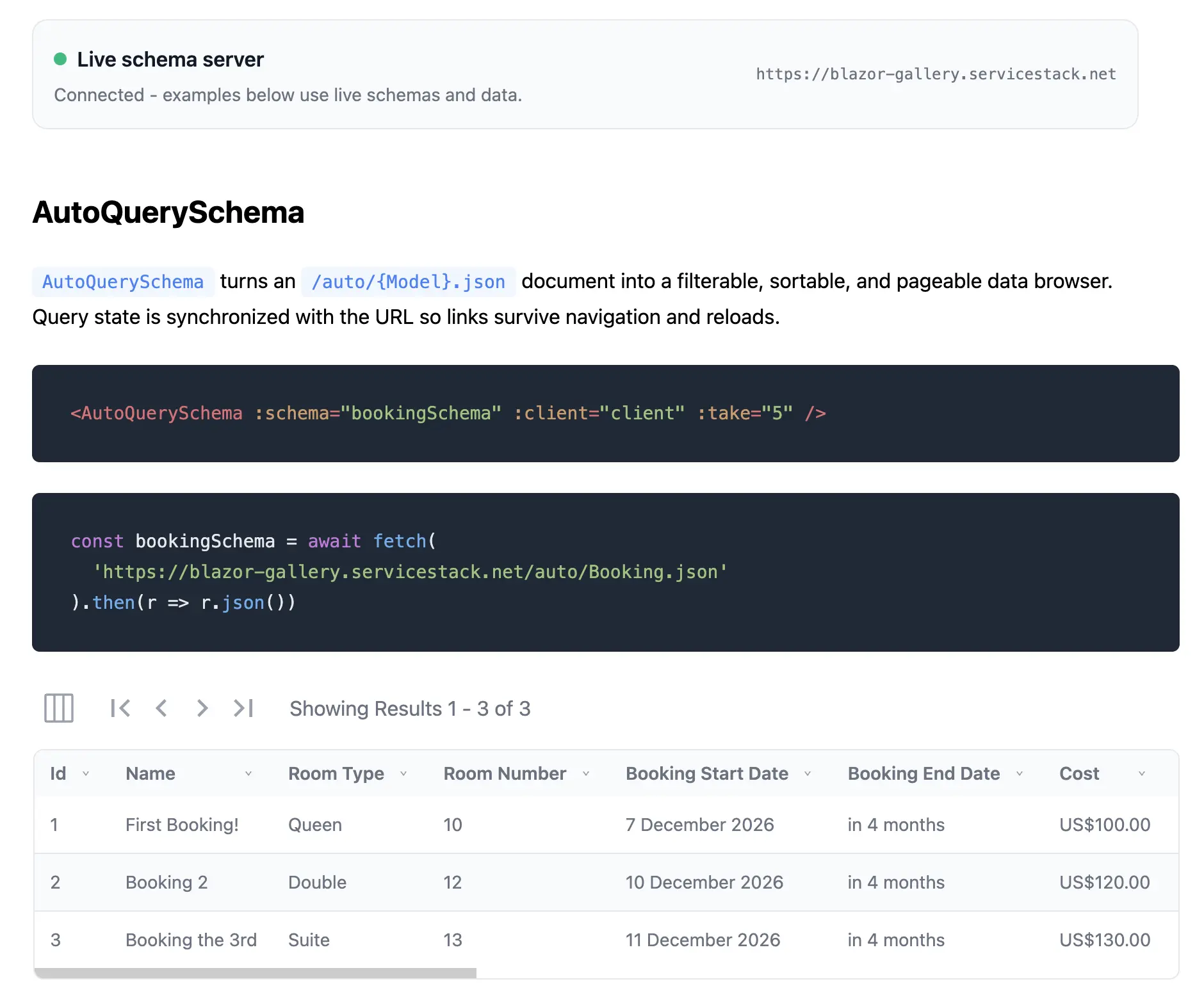
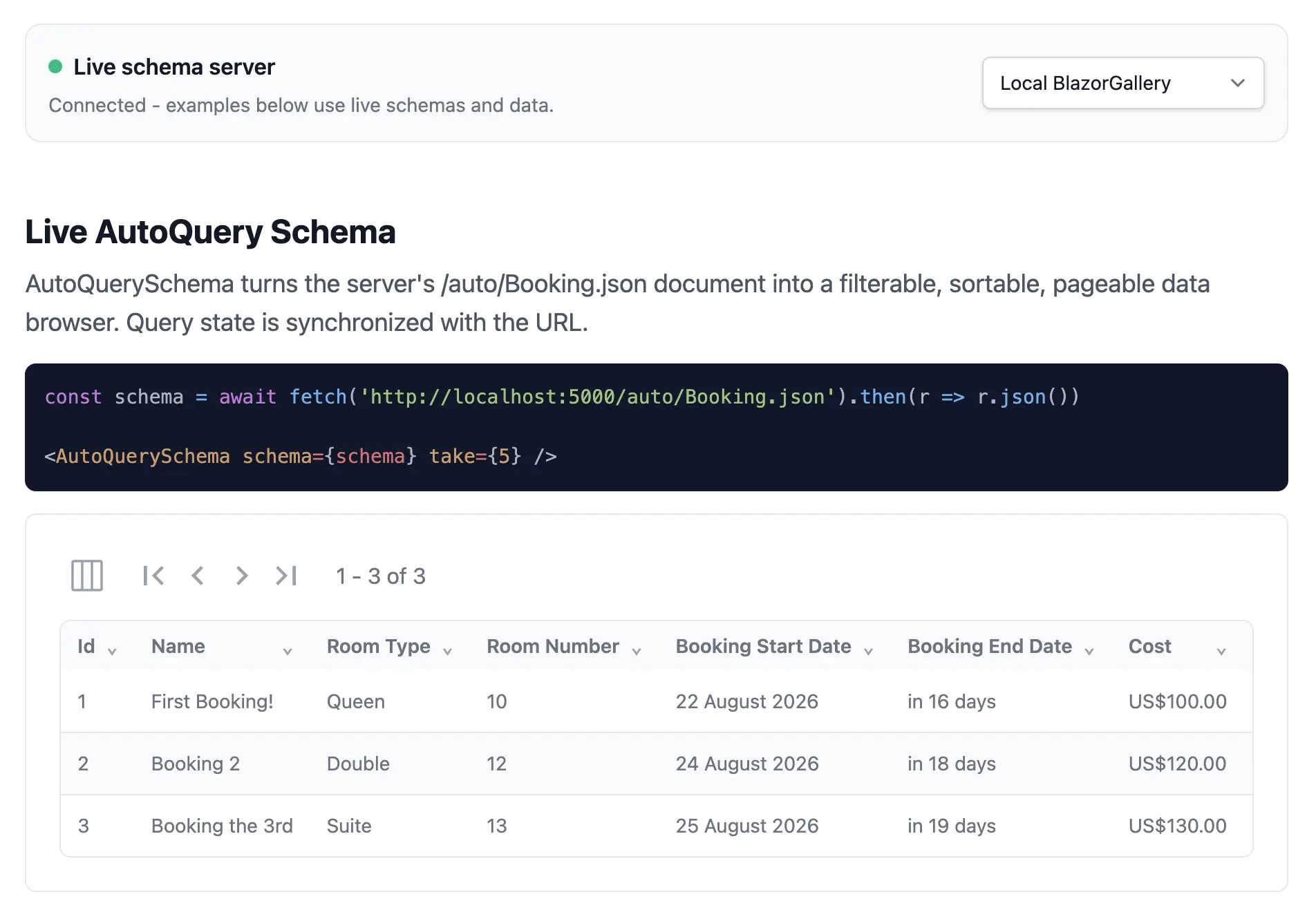
And every AutoQuery model gets a whole App
An API Schema describes one API. Apply the same idea to a data model and you get something larger.
/auto/{DataModel}.json returns an AutoQuery Schema — the model plus every authorized Query, Create, Update, Patch, Delete and Save API around it — and /auto/{DataModel} renders it as a complete CRUD application with a results grid, paging, sorting, filters, lookups and guarded Delete actions.
Same Metadata feature, same runtime authorization, nothing to install. We covered it in Instant CRUD Apps with AutoQuery Schemas.
Authorization remains server-owned
Schema discovery respects the current request and authenticated session. APIs excluded from metadata or inaccessible to the caller are not presented as available capabilities.
Schemas also carry the API's authentication requirements, including authentication, API keys, required or any-of roles and permissions, required claims and scopes, and authorization policies and schemes.
These details help UIs explain why an operation is unavailable, but they do not replace enforcement. The API remains the final authorization boundary when invoked.
This is essential for generated UIs and AI Assistants: presentation can adapt to the caller, whilst security remains deterministic and server-side.
Better metadata now has compounding returns
Clear API descriptions and declarative validation have always made ServiceStack applications easier to use. API Schemas multiply their value.
One well-described Request DTO can now improve:
- API documentation
- API Explorer
- Generated client DTOs
- Built-in schema forms
- Custom Vue and React forms
- Automated testing tools
- AI tool discovery
- AI-generated approval UIs
- MCP clients consuming API Tools
There is no synchronization problem because every experience is generated from the same application contract.
APIs that explain and demonstrate themselves
An API should not require a developer to read its implementation before they can use it.
With the new schema endpoints, every ServiceStack API can explain its structure in JSON and demonstrate itself through a complete executable UI. The contract is available to code, the UI is available to people and the same schema can safely bridge AI intent into user-approved actions.
Your existing APIs already contain the application knowledge. API Schemas make that knowledge portable.
Get Started
There is nothing to install. API Schemas are part of the Metadata feature, so any .NET 8+ ServiceStack App already serves them.
Run your App and open:
To embed the components in your own App, add the client library for your framework:
Both export ApiFormSchema and JsonSchemaForm with the same behavior, so the snippets above translate directly.
If you'd rather not expose the pages in production, they can be disabled without affecting the JSON contract used by AI Chat and your own components:
services.ConfigurePlugin<MetadataFeature>(feature => {
    feature.DisableApiSchema = true;
});
Schemas can also be customized before they're returned with OnApiSchema — see the API Schema docs for the complete reference.
The fastest way to see the value is to open /schema on an App you already have and search for an API you wrote months ago. Whatever descriptions and validation you gave it then are the UI you get now.


