ServiceStack PDF Studio — From AI Design to Production PDFs


The complete PDF lifecycle for .NET Apps
Here is what we want at the end: an ordinary ServiceStack API that returns a real invoice, with no LLM anywhere near it.
public class InvoiceServices(IPdfRenderer pdf) : Service
{
    public async Task<object> Any(GetOrderInvoice request)
    {
        var order = await Db.LoadSingleByIdAsync<Order>(request.Id);
        return await pdf.PdfResultAsync(MapToInvoice(order), $"Invoice-{order.InvoiceNo}.pdf");
    }
}
And here is the part that normally takes a week: designing the document, agreeing its data contract, testing the awkward payloads, and getting a typed C# model that matches. In PDF Studio you describe the document you want — or hand a vision model a screenshot of the one you're replacing — and iterate on a live preview until it's right.
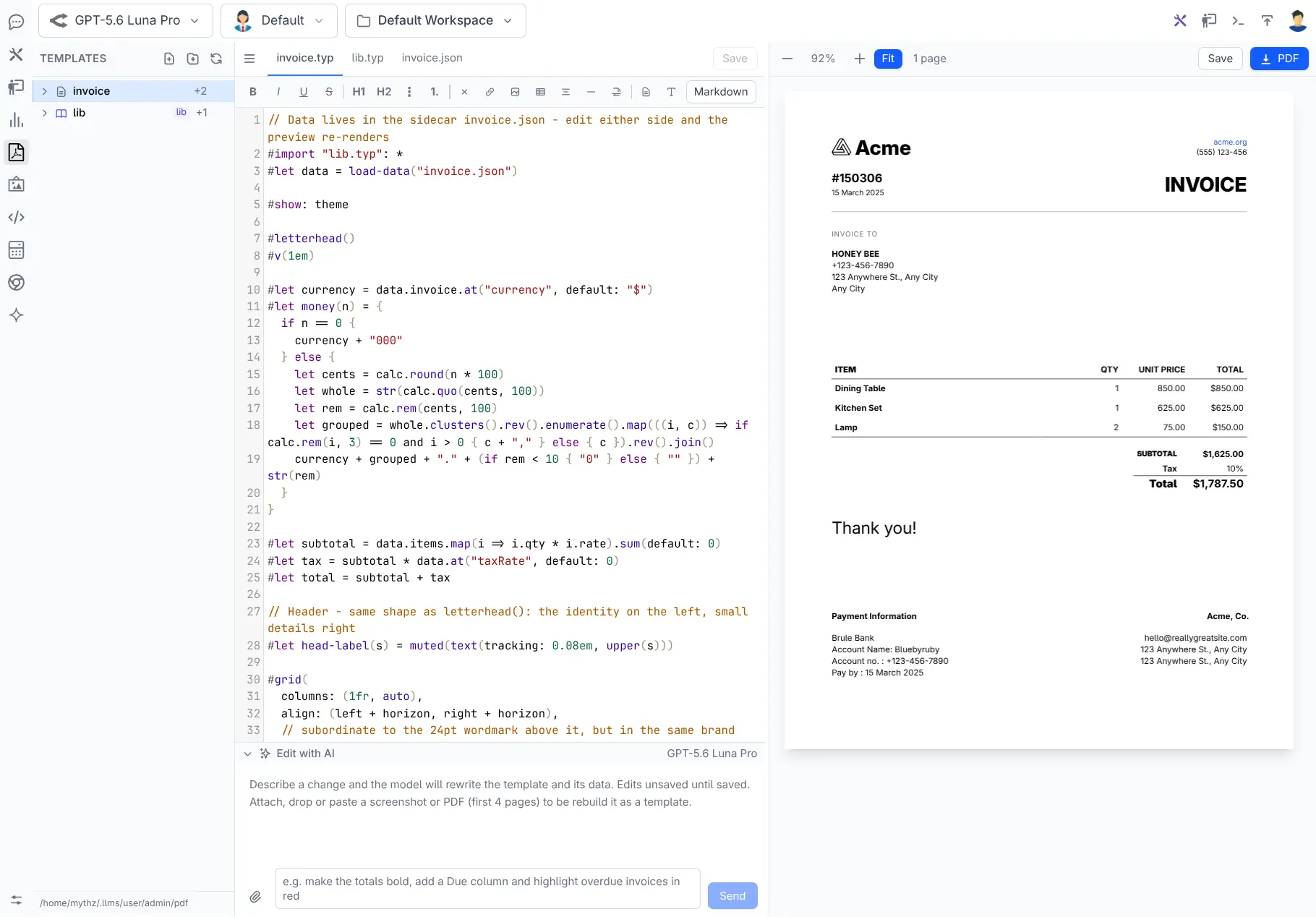
Generating a PDF is easy. Maintaining a production document system is not. Invoices, statements, certificates, reports, shipping labels and contracts need precise layouts, realistic test data, reusable styles, typed application integration, predictable deployment and a safe way to evolve without breaking documents customers depend on.
ServiceStack's new PDF support addresses the whole lifecycle:
AI Chat PDF Studio → Publish → Admin PDF → Generate C# → Render in your App
PDF Studio at /chat/pdf is an AI-assisted development environment for creating Typst templates. Publishing promotes a validated, flattened and versioned artifact into App_Data/pdf. Admin PDF at /admin-ui/pdf lets administrators test the exact production template, inspect its contract and generate strongly typed C# models. IPdfRenderer then renders PDFs from ordinary application code without calling an LLM.
The result combines the speed of AI-assisted design with the deterministic runtime needed by business applications.
Two plugins, so AI never reaches production
| Capability | Plugin | Runtime dependencies |
|---|---|---|
| AI-assisted authoring and live preview | ChatFeature PDF extension |
Typst and an AI provider |
| Published template management and rendering | PdfFeature |
Typst |
An organization can design documents in a development environment with AI Chat, then deploy only PdfFeature, Typst and the published artifacts. Production rendering does not require ChatFeature, an AI provider or an API key.
That clean boundary is fundamental: AI accelerates authoring, but does not sit in the path of every invoice your application generates.
Why Typst
ServiceStack uses Typst because it brings modern, code-first authoring to high-quality document layout. Templates are plain text, compile quickly and can express precise typography, tables, page structure, reusable functions and conditional content.
A document named invoice normally contains:
invoice.typ
invoice.json
invoice.ui.json
invoice.fixture.empty.json
invoice.fixture.long.json
lib/v1.typ
Each file has one clear responsibility:
invoice.typowns layout and rendering.invoice.jsonsupplies realistic preview data.invoice.ui.jsondescribes the data contract as JSON Schema.invoice.fixture.*.jsonexercises important payload shapes.lib/v1.typsupplies versioned shared styles and helpers.
This separation makes templates easier to design, test, review and integrate than documents where layout and business data are inseparable.
Design in AI Chat PDF Studio
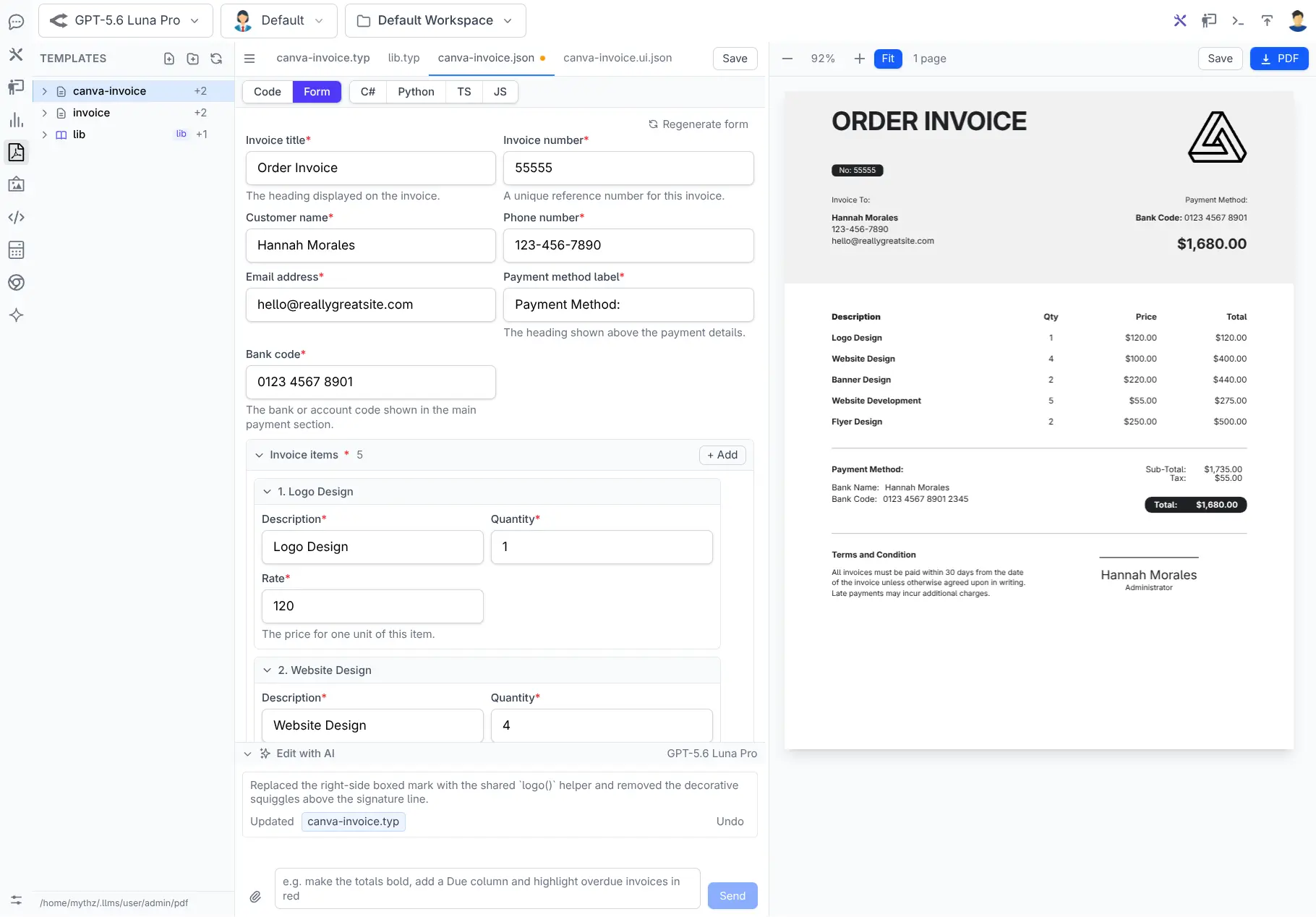
PDF Studio opens with a Typst editor and a real rendered PDF preview. Edit the template or its data and the document recompiles immediately.
The workspace is per user under App_Data/chat/user/{user}/pdf, so developers and designers can experiment independently. Nothing becomes a shared runtime template until an administrator explicitly publishes it.
PDF Studio inherits AI Chat's Integrated Auth, allowing existing application users to enter with their current ServiceStack identity whilst keeping drafts, assets and experiments isolated in their own workspace. Publishing is a separate Admin-authorized boundary, so access to the designer does not imply permission to change the templates used by production.
The designer separates layout and content into focused panes:
Form and Code views for document data
The JSON data can be edited directly in Code View or through a form generated from invoice.ui.json. Form View provides labels, date inputs, enum selections and add/remove controls for line items without requiring users to edit JSON.
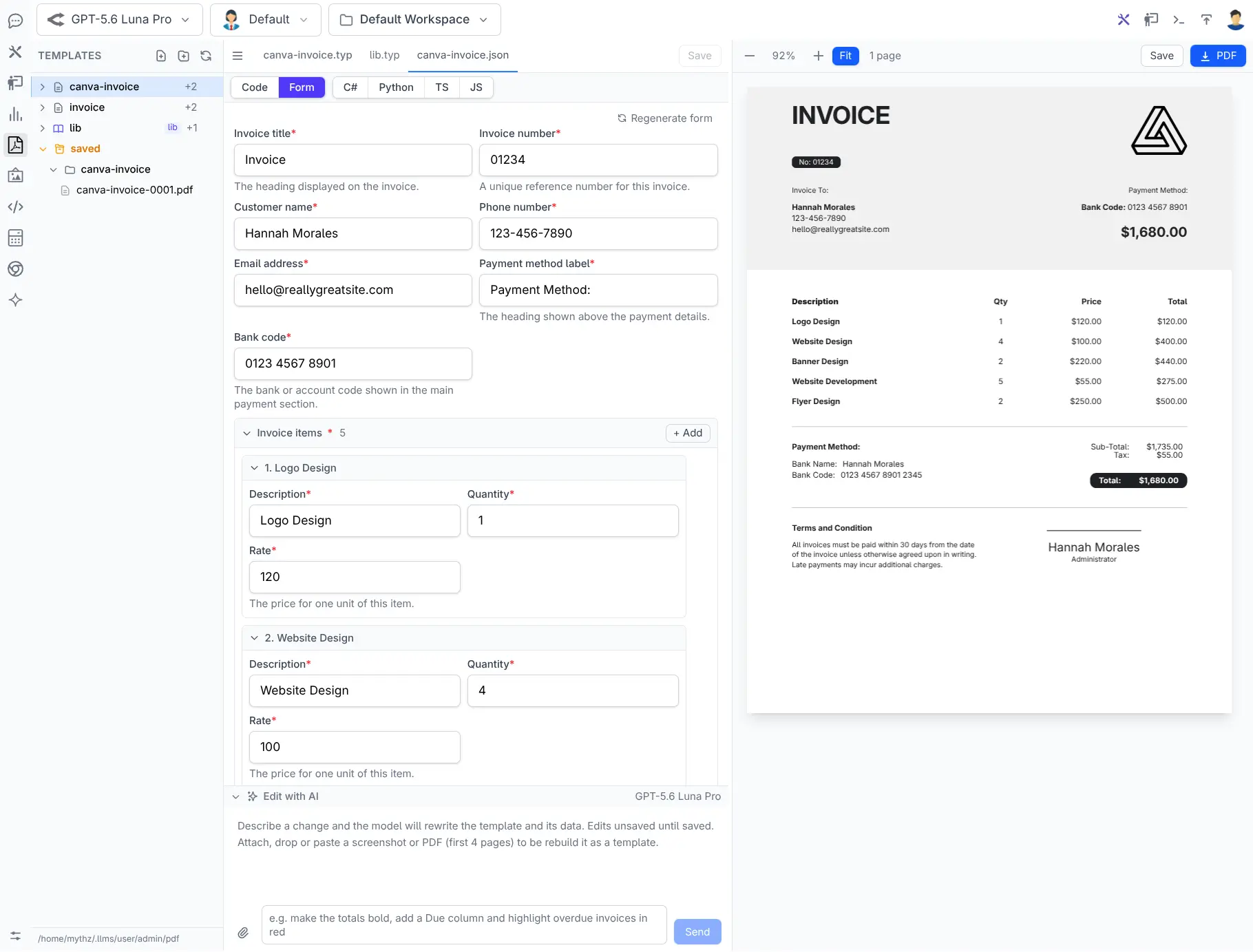
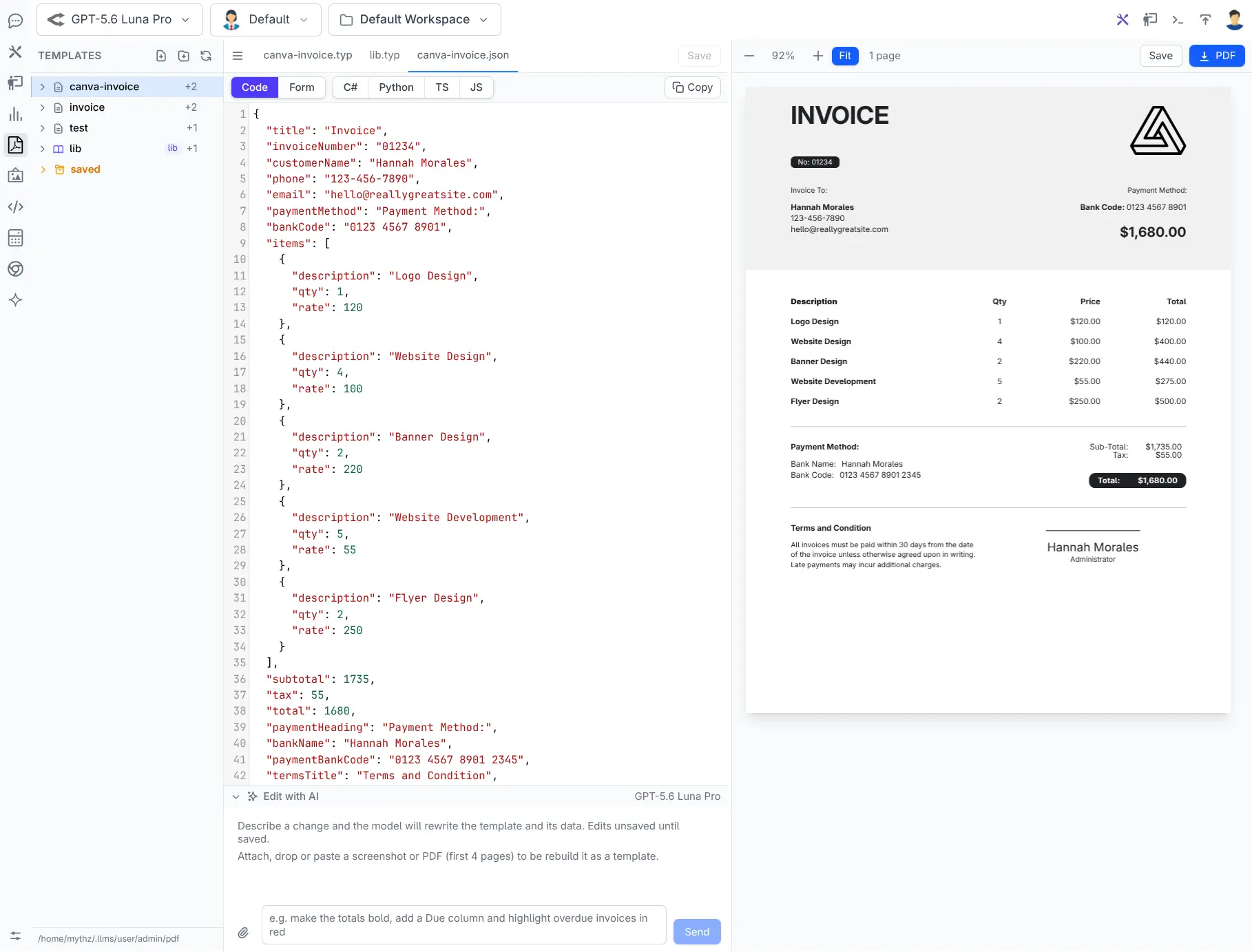
Every edit uses the same data contract that will later generate the application's C# model. The preview is not a disconnected design mock-up; it is an executable example of the production template.
Edit layouts with natural language
The Edit with AI panel gives the model the current template, its data and referenced partials. Describe the change you want:
Add a Paid watermark when the outstanding balance is zero.
Move the totals into a bordered box and show tax on a separate row.
Reformat this as a 4×6 shipping label with no page margins.
The model returns complete updated files and Studio compiles them immediately. If the first edit fails to compile, the model gets a repair pass with the compiler error.
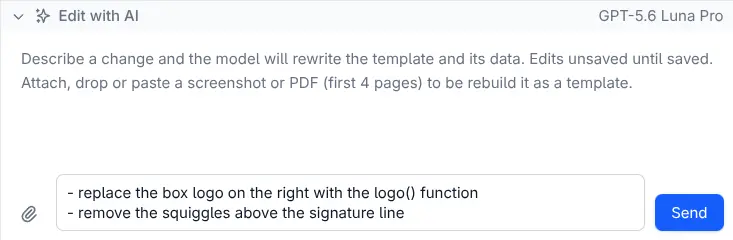
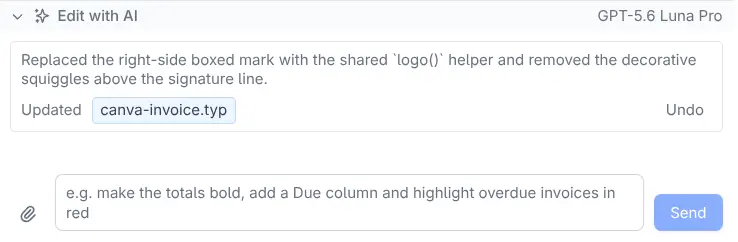
AI edits update editor buffers rather than silently committing files. Unsaved changes remain visible and the previous contents can be restored, making experimentation fast and reversible.
Recreate an existing document with vision
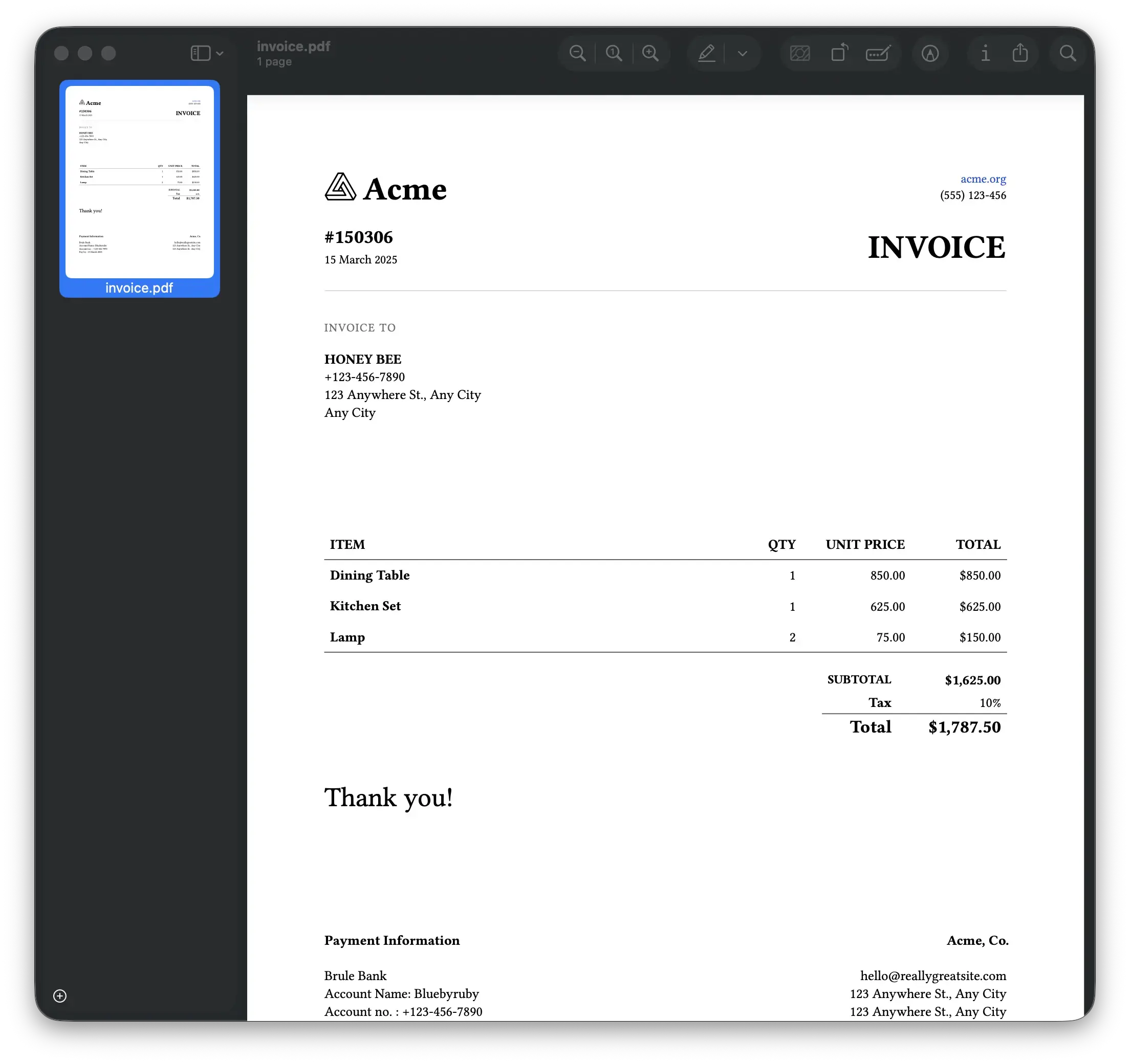
Starting from a blank page is rarely necessary. Attach screenshots, photos or rasterized pages from an existing PDF and ask a vision-capable model to reproduce the design as a reusable Typst template.
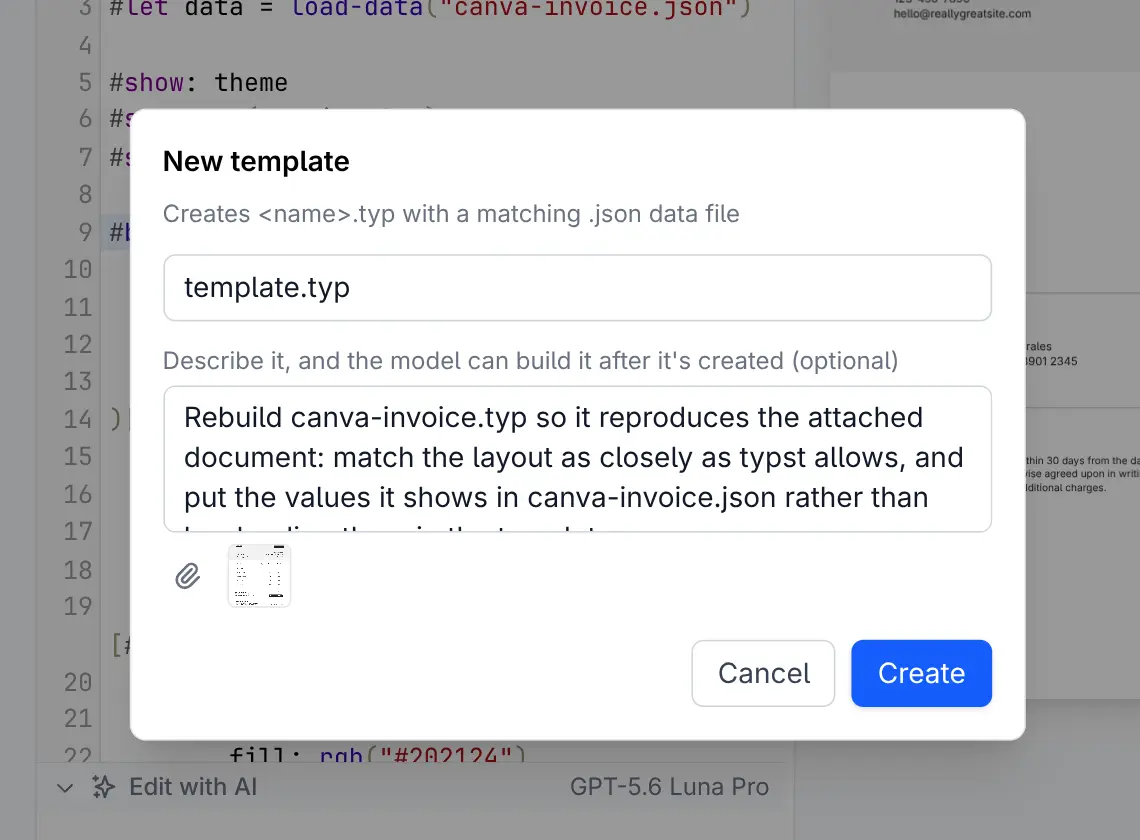
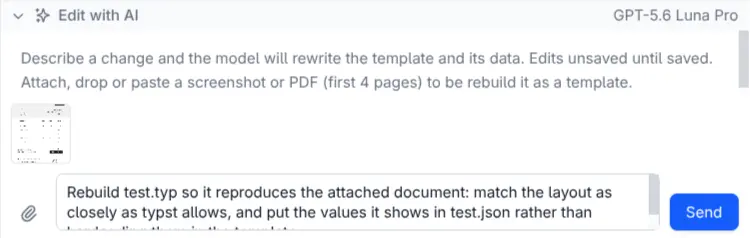
The model separates visual layout from sample content and creates a new template and JSON data model. This is visual reconstruction—not structural PDF conversion—but it is an extraordinarily fast way to turn a legacy document into maintainable source.
Design visually without memorizing Typst
PDF Studio includes formatting controls for common design operations:
- Font discovery and preview
- Font size, weight and line height
- Page sizes from A3–A6, Letter, Legal and presentation formats
- Portrait and landscape orientation
- Margins
- Image and asset selection
- Shared library previews
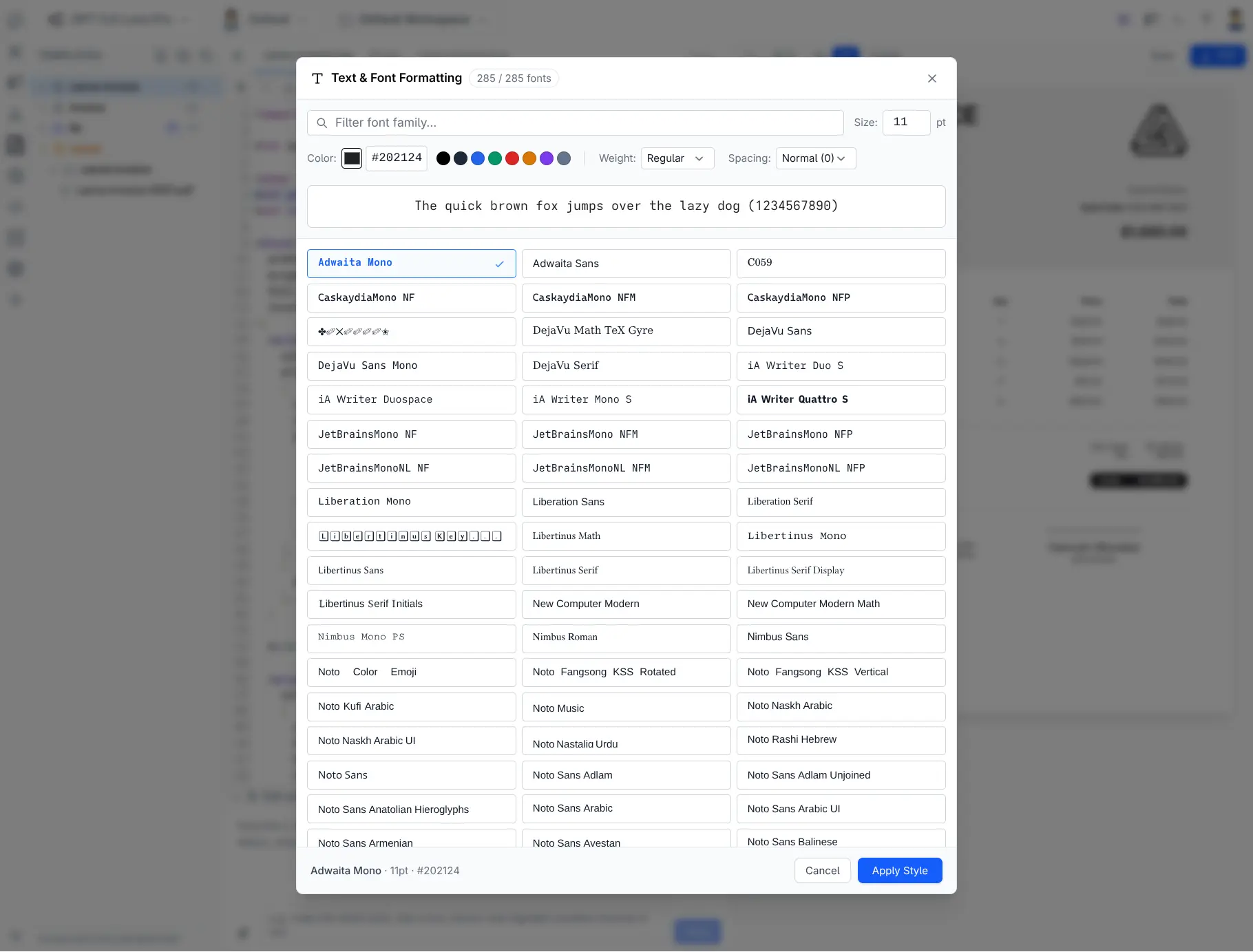
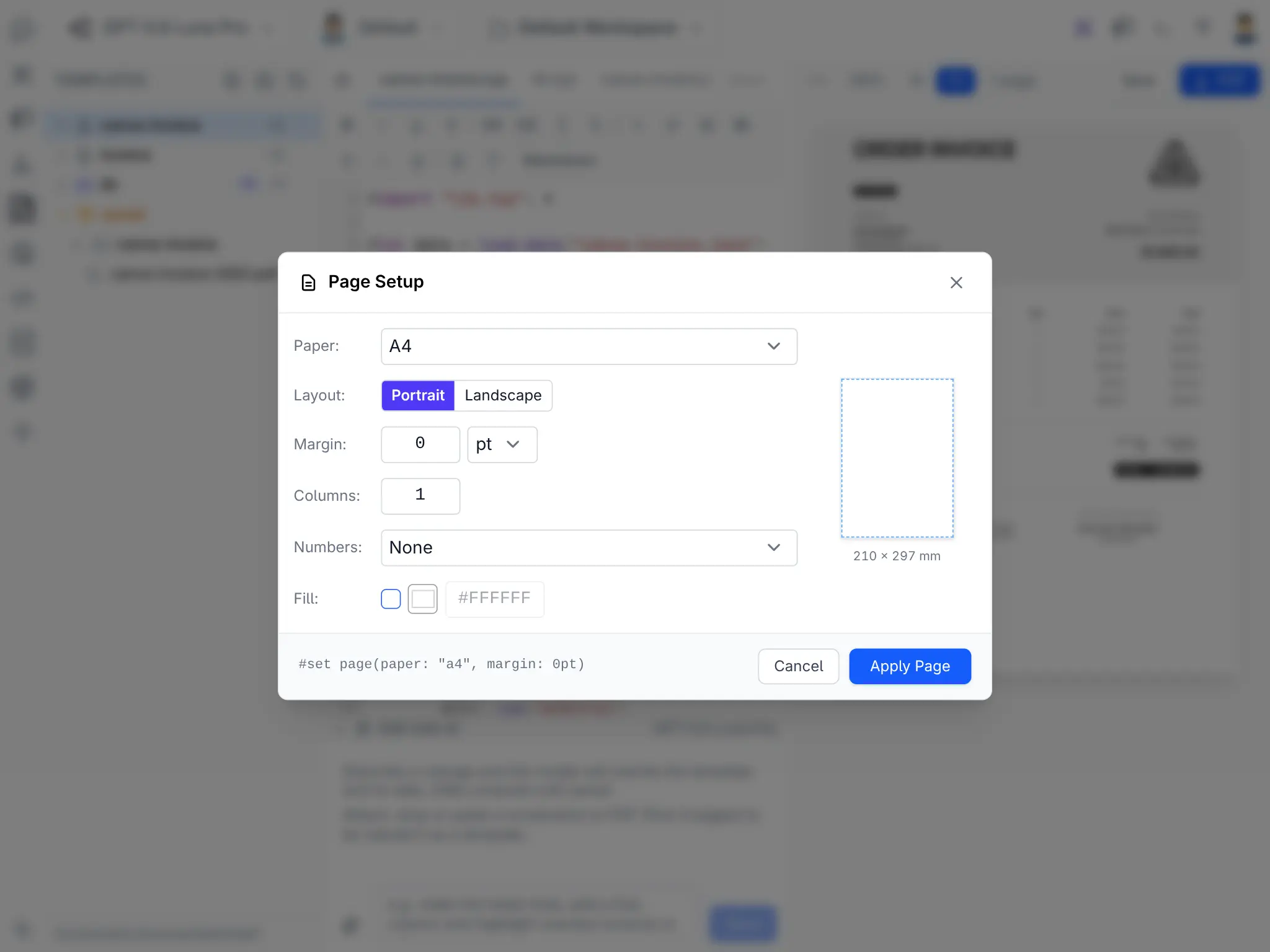
The controls modify source rather than hiding it. Developers retain a readable Typst template whilst less experienced authors can make common visual changes confidently.
Versioned design systems
Shared document design belongs in a library, but changing that library should not unexpectedly reflow every historical template.
New workspaces use explicit imports such as lib/v1.typ. Shared fonts, colors, formatters, headers and footers live in that version. An incompatible redesign becomes lib/v2.typ, allowing templates to migrate one at a time.
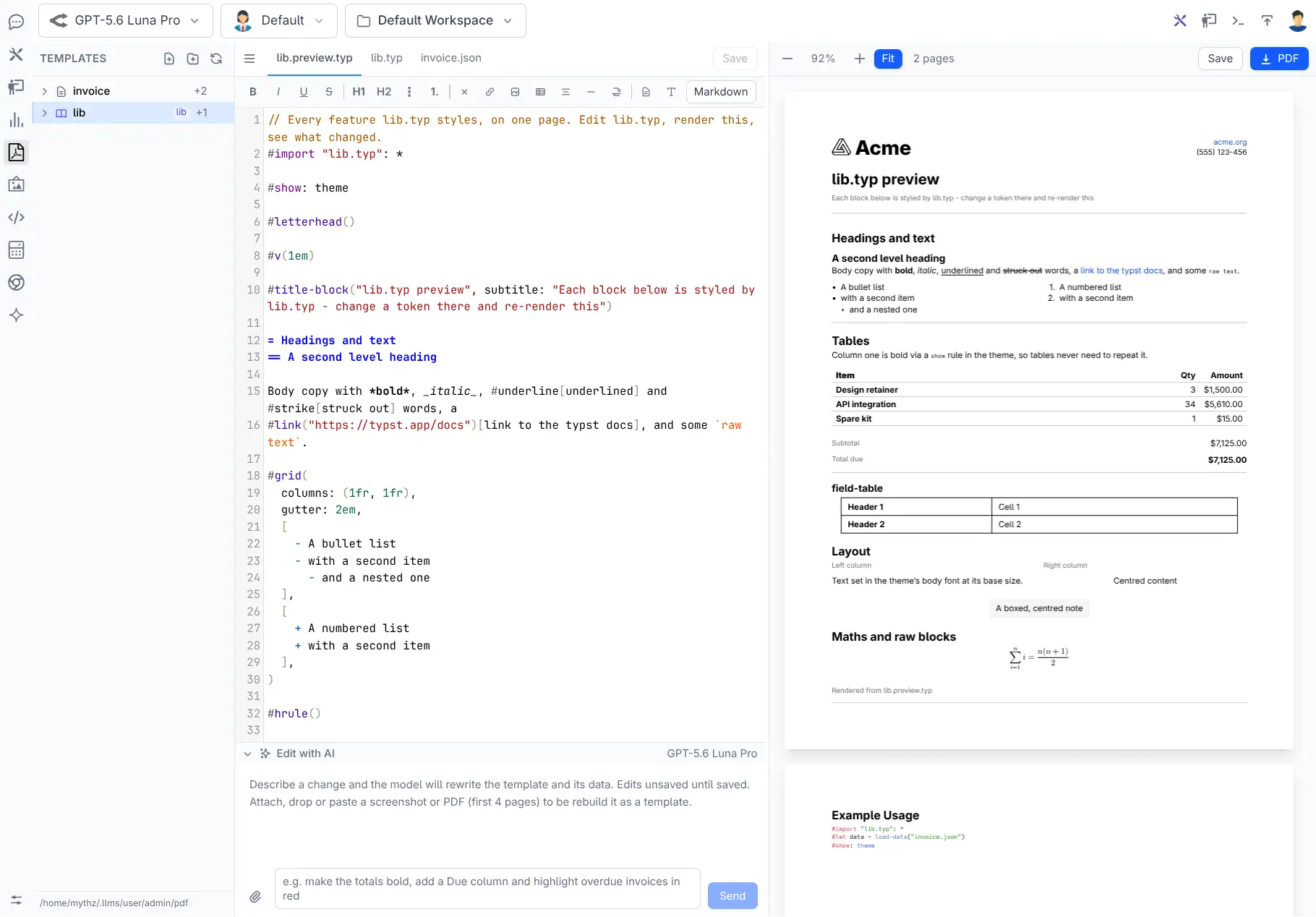
lib/v1.preview.typ renders the design system itself so typography and components can be checked independently:
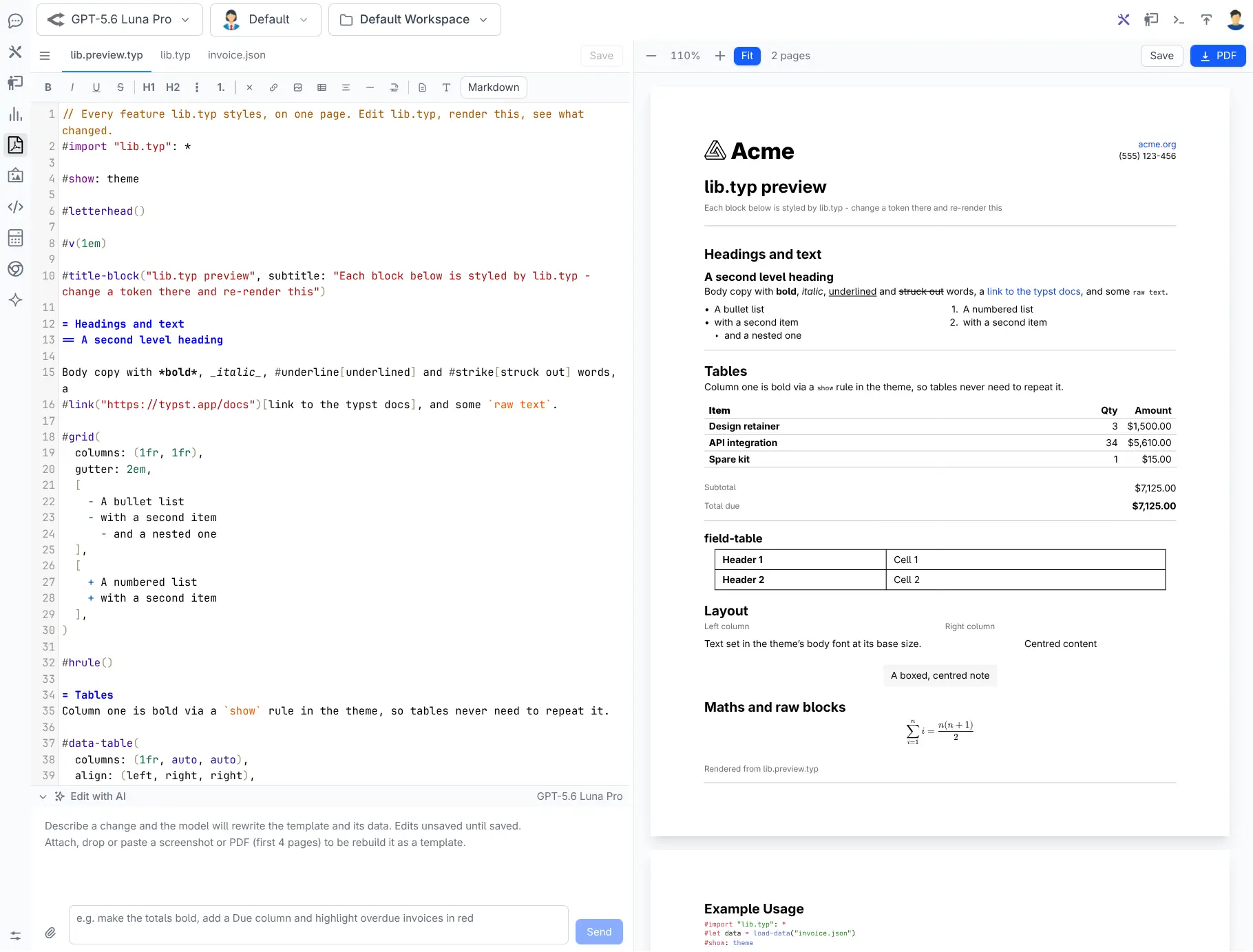
PDF Studio tracks direct and transitive dependencies. A referenced library cannot be renamed or deleted until its dependants are moved, and publishing captures the exact imported library with the document's artifact set.
This protects production documents from accidental global changes whilst still giving teams a coherent visual system.
Publish is a controlled promotion boundary
Design work remains private until an administrator chooses Publish. Publishing copies the template from the user's Studio workspace into the App's shared App_Data/pdf runtime directory.
It performs substantially more work than a file copy:
- Follows JSON data, Typst includes, images, assets and versioned libraries.
- Flattens folder-based authoring into a self-contained runtime artifact set.
- Rewrites local references for the flattened result.
- Validates example data and named fixtures against
.ui.json. - Exercises C# model generation.
- Checks statically visible data paths.
- Compiles every fixture through the actual flattened Typst template.
- Generates the gallery preview.
- Records publisher and source metadata.
- Prevents silent takeover of a name published by another user.
- Rolls back the publish if validation or compilation fails.
- Saves every successful publish as an immutable revision.
This changes publishing from “copy whatever currently works on my machine” into a repeatable release step.
Contract fixtures catch the failures that matter
One sample invoice cannot represent every production invoice. Add named fixtures beside the template:
invoice.fixture.empty.json
invoice.fixture.long.json
invoice.fixture.international.json
invoice.fixture.maximum-items.json
At publish time, every fixture is checked against the JSON Schema and rendered with the flattened template. A payload can therefore be structurally valid yet still block publishing if long text, an empty collection or international characters trigger a Typst failure.
The built-in validator covers the schema features generated by PDF Studio, including types, required members, object properties, arrays, enums, numeric and string bounds, patterns, date formats, local references and schema composition.
This is practical contract testing for documents: validate both the data and its ability to render.
Immutable history and reversible rollback
Every successful publish creates a revision under:
App_Data/pdf/.versions/{template}/{revision}/
The revision contains the complete published artifact set, preview and publishing metadata. Admin PDF's History view shows who published each version and when.
Restoring a revision never edits or deletes history. It creates a new revision that records which version was restored, making rollback itself auditable and reversible.
Unpublishing removes the live template but retains its history. This gives teams a lightweight, database-free release history that can be backed up with the rest of App_Data/pdf.
Admin PDF manages what production can render
Open /admin-ui/pdf to browse the templates currently available to the application.
The Admin-only gallery shows publish-time thumbnails with search and sorting. Selecting a template opens a two-pane workspace containing editable data and the real PDF rendered through the production renderer.
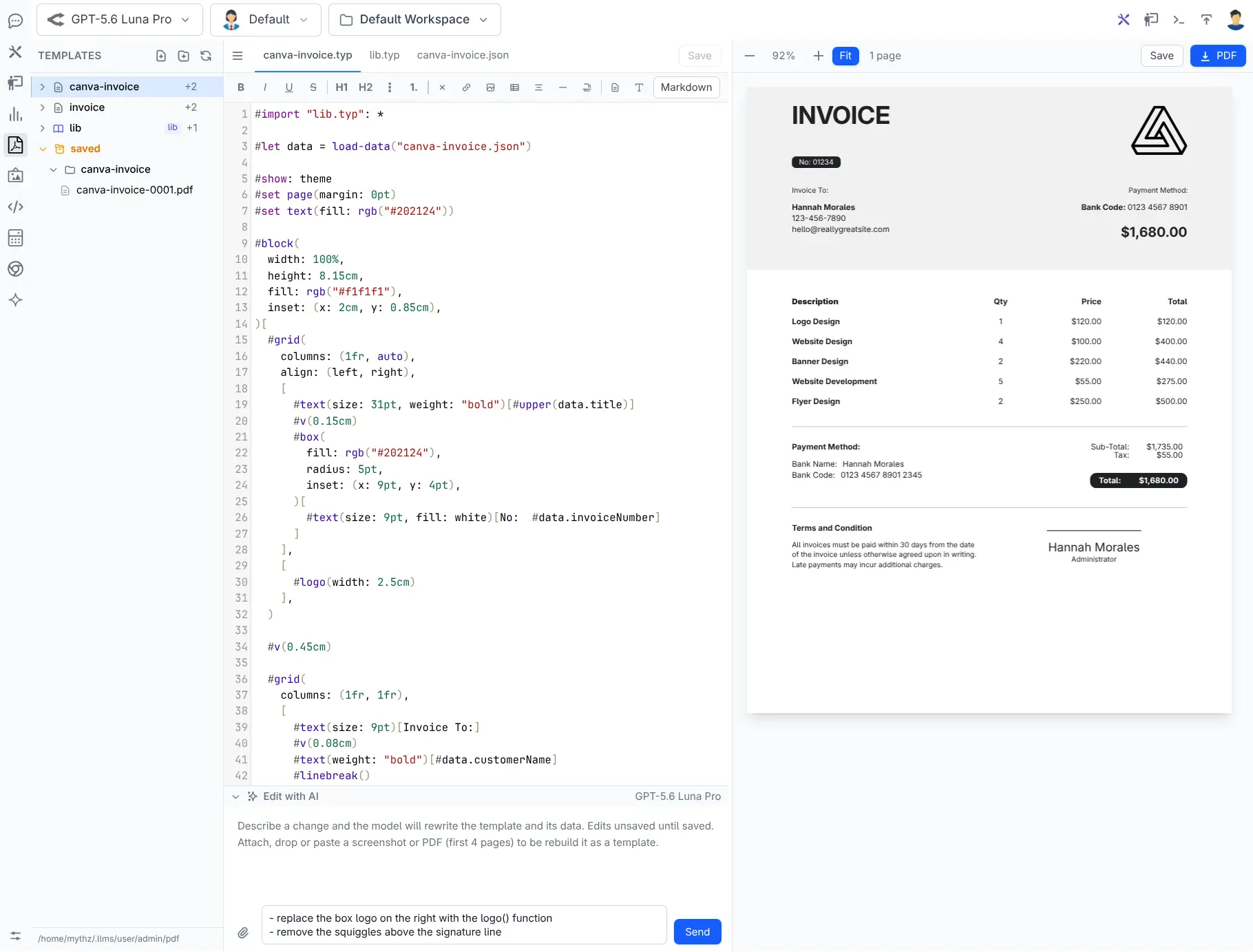
The data pane provides:
- Form — schema-generated controls for testing without writing JSON.
- Data — raw editable JSON for pasting real payloads.
- Code — generated models and usage examples.
The preview uses pdf.js and supports live rendering, zoom, fit, page count and download.
Edit opens the published document back in PDF Studio. If another user created it, the published files are first copied into the current administrator's workspace. Unpublish removes the live runtime files whilst preserving revision history.
Admin PDF is the handoff point between document authors and application developers. It answers three important questions with the real deployed artifact:
- What templates can production render?
- Does this template render with this data?
- What typed code should the App use?
Generate strongly typed C# contracts
The .ui.json schema can generate strongly typed C# models directly from the Admin PDF Code tab:
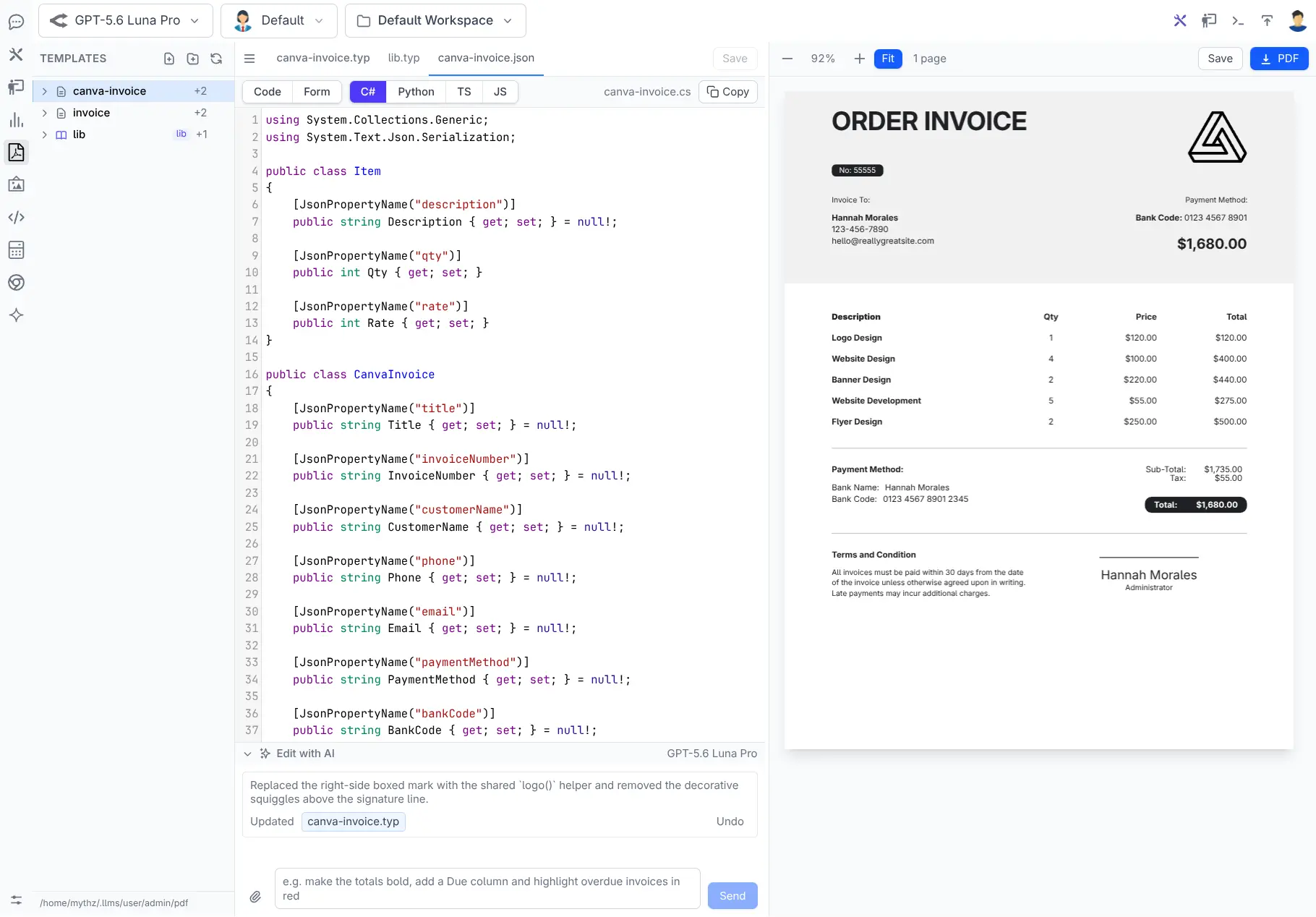
public class LineItem
{
    [JsonPropertyName("description")]
    public string Description { get; set; } = null!;

    [JsonPropertyName("qty")]
    public int Qty { get; set; }

    [JsonPropertyName("rate")]
    public decimal Rate { get; set; }
}

[Pdf("invoice")]
public class Invoice
{
    [JsonPropertyName("items")]
    public List<LineItem> Items { get; set; } = new();
}
[Pdf("invoice")] binds the root model to its published template. Dates, UUIDs, decimals, enums, required members and documentation are inferred from the schema instead of guessed from sample JSON.
For all templates, configure PdfCodeGen and register an AppTask:
services.AddPlugin(new PdfFeature
{
    PdfCodeGen = new()
    {
        Namespace = "MyApp.ServiceModel.Pdf",
        OutputPath = Path.Combine(contentRootPath, "../MyApp.ServiceModel/Pdf"),
    }
});

AppTasks.Register("pdf", _ =>
    appHost.GetPlugin<PdfFeature>().GeneratePdfs());
Then regenerate after publishing template changes:
dotnet run --AppTasks=pdf
Generated files contain content hashes. If a developer adopts and edits one, later generation skips it instead of overwriting their work. Include, exclude, naming and filtering options support larger applications with many templates.
The Admin UI preview and AppTask use the same generator, so the code copied from the browser matches the code written into the project.
Render from an ordinary ServiceStack API
Inject IPdfRenderer, map application data into the generated model and return the PDF:
[Route("/orders/{Id}/invoice")]
public class GetOrderInvoice : IGet, IReturn<byte[]>
{
    public int Id { get; set; }
}

public class InvoiceServices(IPdfRenderer pdf) : Service
{
    public async Task<object> Any(GetOrderInvoice request)
    {
        var order = await Db.LoadSingleByIdAsync<Order>(request.Id);

        var invoice = new Invoice
        {
            InvoiceValue = new InvoiceDetails
            {
                Number = order.InvoiceNo,
                Date = order.OrderDate.ToString("d MMMM yyyy"),
                Due = order.DueDate,
                Currency = "$",
            },
            Items = order.Details.Map(x => new LineItem
            {
                Description = x.ProductName,
                Qty = x.Quantity,
                Rate = x.UnitPrice,
            }),
            TaxRate = 0.10m,
        };

        return await pdf.PdfResultAsync(
            invoice,
            $"Invoice-{order.InvoiceNo}.pdf");
    }
}
PdfResultAsync returns an HttpResult with application/pdf and the correct content-disposition filename. Pass inline: true to display it in the browser instead of downloading it.
For other workflows the renderer can return bytes, write directly to a stream or rasterize a selected page to PNG.
Runtime rendering is deterministic:
- The
[Pdf]model selects the template. - The model serializes to its JSON contract.
IPdfRendererinvokes the published Typst template.- No LLM is called.
- No personal Studio workspace is read.
- Only the live files in
App_Data/pdfare used.
Attach PDFs from background jobs
The same renderer can generate an attachment inside a ServiceStack Command:
[Worker("smtp")]
public class SendInvoiceEmailCommand(
    IPdfRenderer pdf,
    SmtpConfig config,
    IDbConnectionFactory dbFactory)
    : AsyncCommand<SendInvoiceEmail>
{
    protected override async Task RunAsync(
        SendInvoiceEmail request,
        CancellationToken token)
    {
        using var db = await dbFactory.OpenAsync(token: token);
        var order = await db.LoadSingleByIdAsync<Order>(
            request.OrderId, token: token);

        var invoice = MapToInvoice(order);
        var bytes = await pdf.RenderPdfAsync(invoice, token);

        // Attach bytes to your email message and send it...
    }
}
Queue an identifier, not rendered PDF bytes. The worker loads current data and renders inside the job, keeping persisted job messages small and retryable.
This pattern works for scheduled statements, order confirmations, certificates, reports and any other document produced outside an interactive HTTP request.
Production controls are built in
PDF rendering starts external Typst processes, so PdfFeature includes practical operational limits:
- Render and preview timeouts
- Maximum concurrent renders
- Maximum data payload size
- Restricted Typst root directory
- Flat validated template names
- Admin role requirements for every Admin PDF API
- Per-user, path-checked Studio workspaces
- Publish-time validation enabled by default
Production environments should pin the Typst version and deploy the same fonts used during validation. Put application fonts in App_Data/pdf/fonts and back up live artifacts, .published.json and .versions together.
Typst's root restriction limits document file access but is not an operating-system sandbox. Organizations compiling untrusted templates should isolate compilation in an appropriate container or worker.
Clear scope, extensible renderer
The built-in feature is focused on generating PDFs from Typst templates. It supports authoring, AI editing, compilation, publishing, revisions, schema validation, code generation, PDF/PNG rendering and delivery.
It does not claim to be a general PDF manipulation library. Merging, splitting, encryption, digital signatures, PDF/A, AcroForm filling, OCR and structural import belong in a dedicated PDF library or a custom IPdfRenderer pipeline.
Likewise, importing a PDF into Studio gives a vision model rasterized reference pages from which to create a new Typst approximation. It does not preserve the original document's text objects, fonts, forms, annotations or metadata.
These boundaries keep the built-in workflow dependable whilst allowing specialized processing before or after rendering.
AI where it accelerates, typed code where it matters
ServiceStack PDF support uses AI at the point where it provides the most leverage: turning a visual idea or natural-language request into editable document source.
Everything after that becomes a controlled software artifact:
- Typst source defines the layout.
- JSON Schema defines the data contract.
- Fixtures validate important payloads.
- Publish creates a tested immutable revision.
- Admin PDF verifies the production artifact.
- Generated C# provides a typed integration.
IPdfRendererproduces the document deterministically.
This is the missing bridge between “AI made me a nice document” and “our application can safely generate this document for every customer.”
Open /chat/pdf, describe the document you need and publish it when it is ready.
Your ServiceStack App can take it from there.
Get Started
1. Install the Typst CLI and make it available on PATH, or configure TYPST_PATH:
# macOS
brew install typst

# Cargo
cargo install --locked typst-cli
2. Add the plugins to a .NET 8+ ServiceStack App:
This configures both ChatFeature and PdfFeature, so you get the PDF Studio designer and production rendering together. To deploy production rendering without AI Chat, register PdfFeature on its own:
services.AddPlugin(new PdfFeature());
3. Design a document at /chat/pdf. Start from the example invoice or describe what you need and let a model draft it.
4. Publish it, then open /admin-ui/pdf to test the production template with real data and copy the generated C# model.
5. Wire up code generation so the models live in your project:
services.AddPlugin(new PdfFeature {
    PdfCodeGen = new() {
        Namespace = "MyApp.ServiceModel.Pdf",
        OutputPath = Path.Combine(contentRootPath, "../MyApp.ServiceModel/Pdf"),
    }
});

AppTasks.Register("pdf", _ => appHost.GetPlugin<PdfFeature>().GeneratePdfs());
6. Inject IPdfRenderer and return the document from any API, Command or background job.
Before deploying, pin the Typst version and deploy the same fonts used during validation — put application fonts in App_Data/pdf/fonts and back up App_Data/pdf including .published.json and .versions.


