SaaS Next.js Project Template


Every SaaS product needs the same foundation before it can charge its first customer. You need sign up and sign in, organizations with team roles, pricing plans, Stripe subscriptions and webhooks, usage limits, API keys, audit logs, data export and deletion, and a back office to support your customers. None of it is your product, but all of it has to work before you can launch.
Next SaaS is a new React Template that includes that foundation, so you can start on the part that's unique to you. It's built with .NET 10, ServiceStack, ASP.NET Core Identity, React 19 and Next.js 16, and it includes three complete Apps from day one:
- Public Site - a product landing page, pricing rendered from published plan versions, ASP.NET Core Identity sign up and hosted Stripe Checkout with trials, coupons and promotion codes
- Customer App - organization dashboards, organization-scoped file storage, real-time usage meters and quotas, plan and billing management through the Stripe Customer Portal, team roles, API keys, audit logs and data export, ownership transfer and delayed deletion
- Operations Center - platform-wide commercial health, a Customer 360 view, an immutable plan editor, Stripe-synced coupons, platform usage analytics and recovery of failed webhooks, jobs and integrations
Take a tour through each of them:
Create a new Next SaaS project with:
npx create-net next-saas ProjectName
What's included
The template ships with Acme, a small example product for secure document storage and usage analytics. Acme is kept small on purpose. It shows how subscriptions, quotas, storage, analytics, teams and operations fit together, but it doesn't push its own domain onto you. You replace Acme with your product and keep the parts every SaaS needs:
One App to run and deploy
Next SaaS runs as one ASP.NET Core App. ASP.NET Core and ServiceStack handle authentication, APIs, persistence, billing, background work and hosting. Next.js provides the React UI as a static export, so there's no Node.js server to run in production:
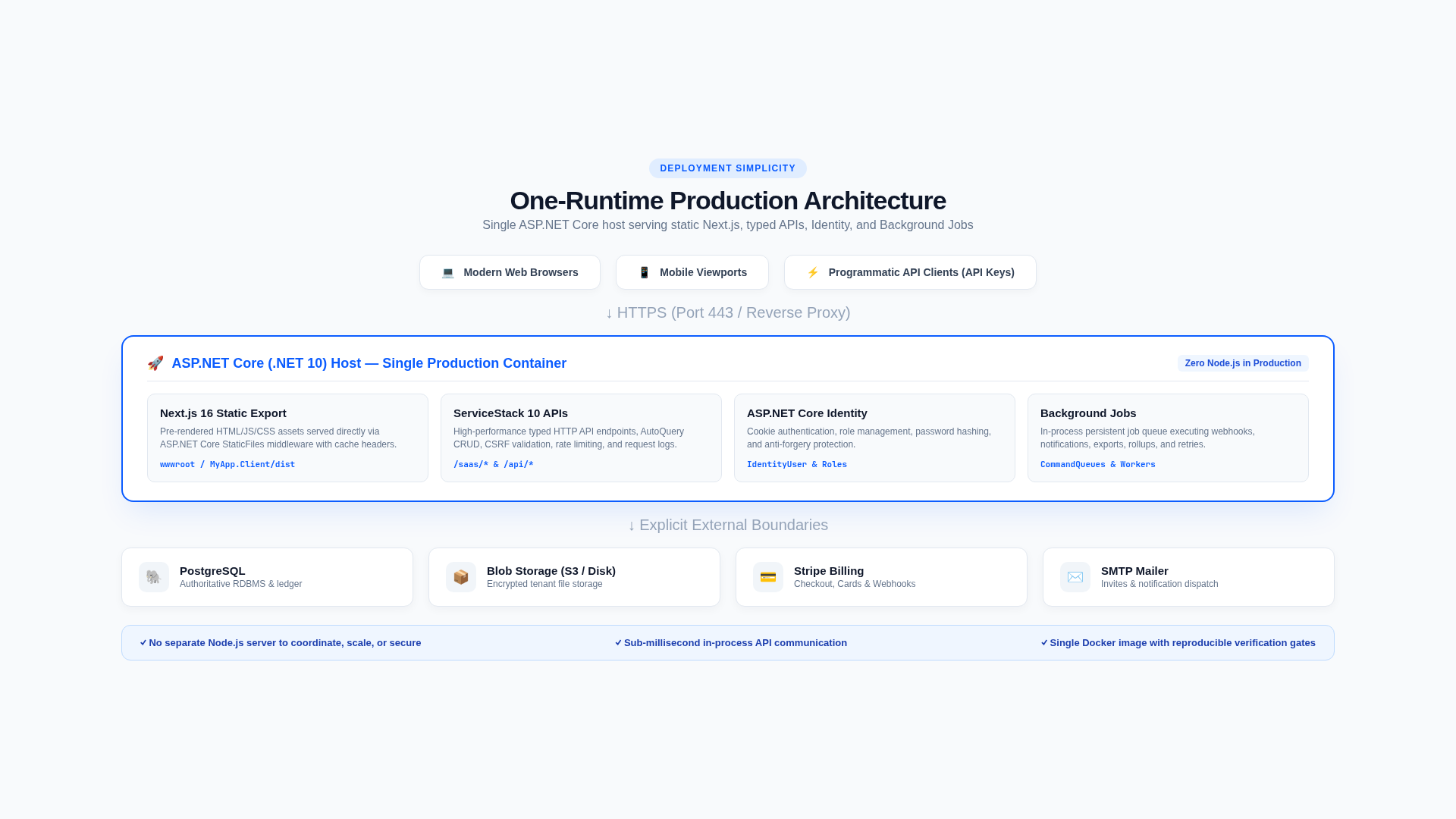
In development, dotnet watch starts the Next.js dev server and proxies it, so you get HMR on the same
origin as your Identity cookies and APIs. In production, next build generates static files that are
published to the App's wwwroot. Your App has one public origin in both environments, so there's no CORS
to configure and no second server to deploy.
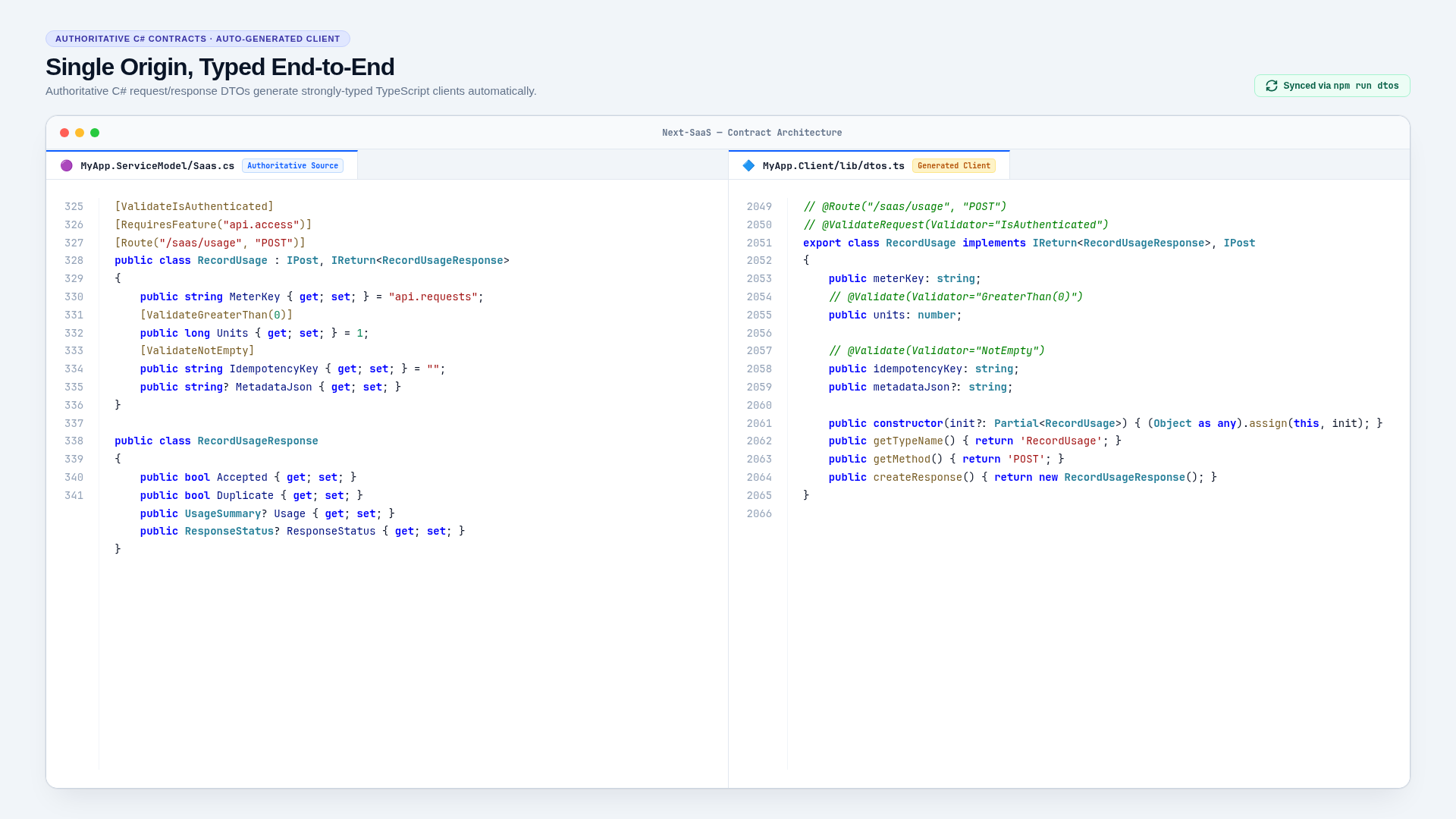
Every API is a typed ServiceStack Service. C# Request DTOs in MyApp.ServiceModel are the source of truth,
and the React client calls them through the TypeScript DTOs generated from them. You can follow any feature
from its DTO, to its Service, to the page that calls it:
It also supports your preferred database. A single DB_PROVIDER setting selects SQLite, PostgreSQL,
MySQL or SQL Server for both local development and production, so you develop against the same
database you deploy to. SQLite is the zero-dependency default. For the other databases, ./scripts/dev-db.sh up
runs the same database image locally that your deployment uses.
Organizations and teams
Customers sign up with a Personal account for themselves or a Business organization for their team. One user can belong to many organizations and switch between them. Each organization has its own data, billing, quotas, files and API keys.
Business organizations have 4 roles:
| Role | Permissions |
|---|---|
| Owner | Everything, including ownership transfer and deleting the organization |
| Admin | Members, settings, exports and day-to-day administration |
| Billing | Billing and subscription management |
| Member | Uses the product features their plan includes |
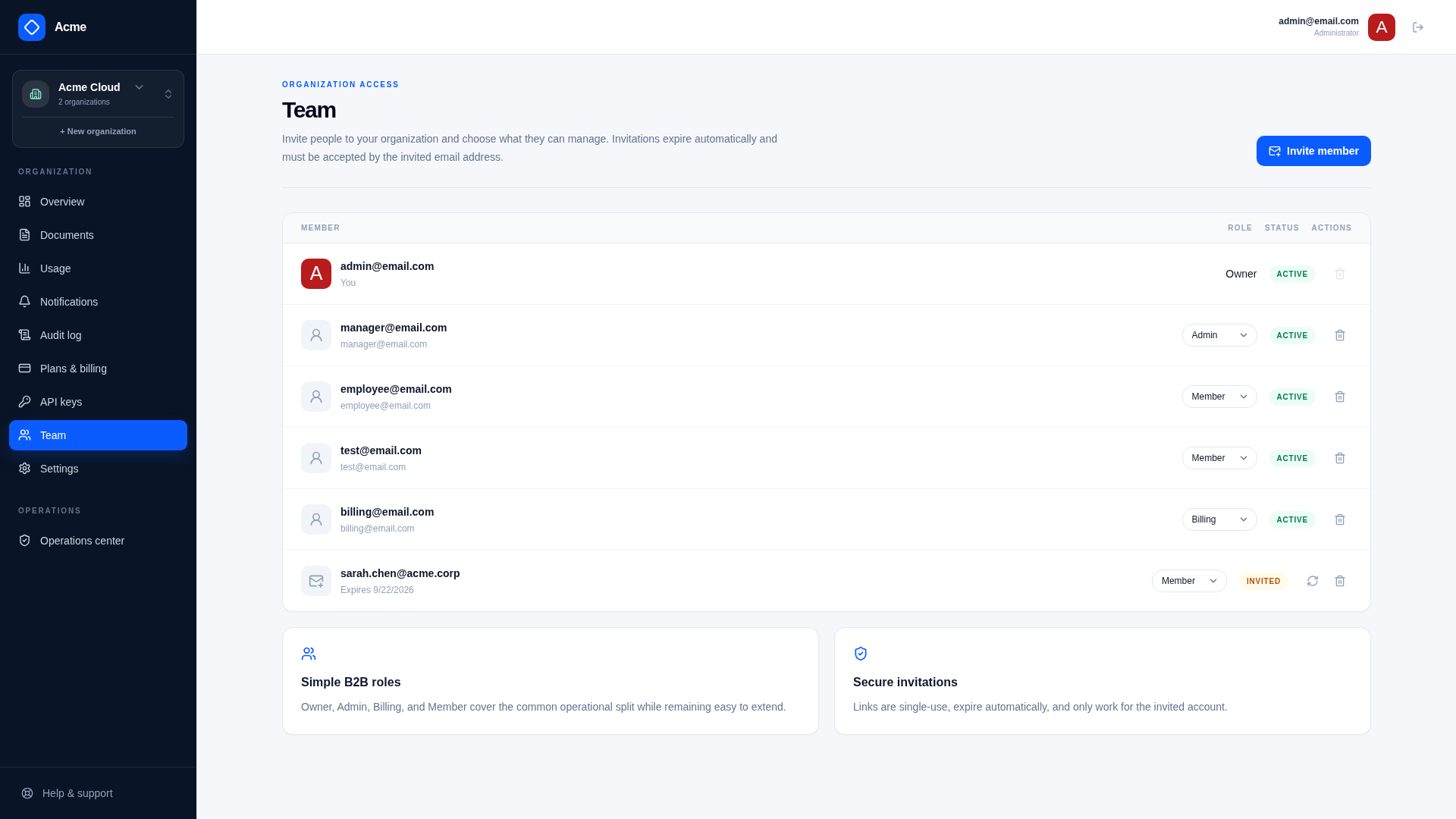
Invitations use one-time tokens that expire, and can only be accepted by a signed-in user with a matching verified email. The Owner role can't be removed by mistake: an organization always has an Owner, and an Owner can only leave by transferring ownership to another member first.
Tenant isolation, enforced on the server
The browser is never trusted to decide which organization's data it can see. Every customer request goes
through IWorkspaceContextResolver, which reloads the caller's active membership on the server. Every query
for customer data is then filtered by that organization:
var widget = Db.Single<Widget>(x =>
    x.Id == request.Id &&
    x.WorkspaceId == context.Workspace.Id)
    ?? throw new HttpError(404, "WidgetNotFound", "The widget was not found.");
The same rule applies to files, exports, analytics and background jobs. Every table is also classified as
global, tenant-owned or platform-operational in features.json, and an architecture test fails the
build if you add a table without classifying it.
API keys are bound to the organization they were created in, not to whatever organization the browser has selected. They're shown once, listed afterwards by fingerprint, and can't be used to manage other keys.
Stripe billing off the hot path
Stripe handles payments, and your database handles access. Customers subscribe through Stripe Checkout and manage their payment methods, invoices and cancellations in the Stripe Customer Portal. You don't have to build any of that UI:
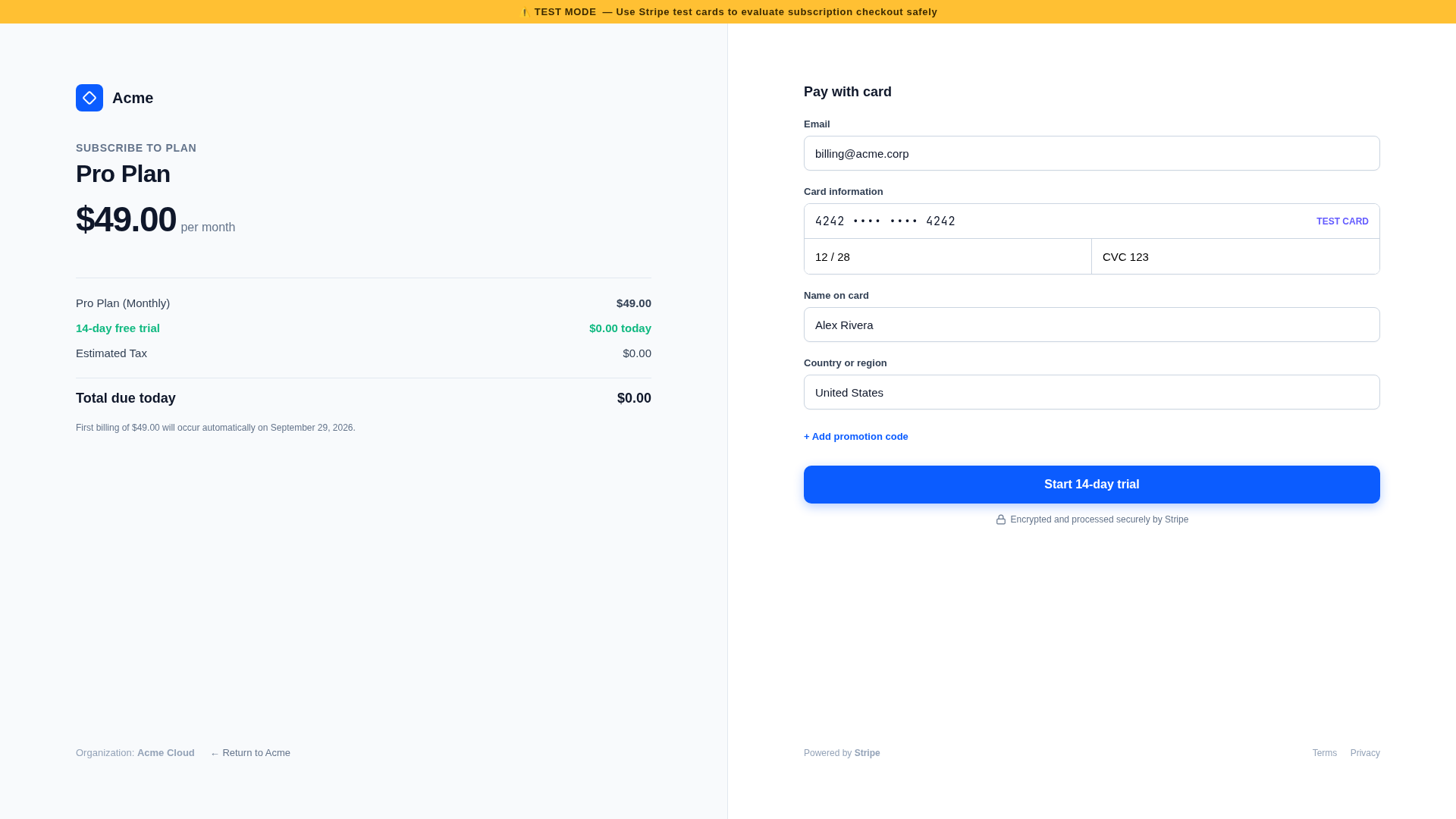
Signed Stripe webhooks keep a local BillingSubscription up to date. Every request checks access against
this local copy, so Stripe is never called to decide whether a request is allowed. Stripe latency and
outages don't slow down or break your App.
Each webhook event is recorded once in an inbox table and processed by a Background Job, so duplicate deliveries are harmless. Failed events keep their attempts and errors, and operators can retry them from the Operations Center. An hourly job also reconciles subscriptions with Stripe to repair any webhooks that were missed:
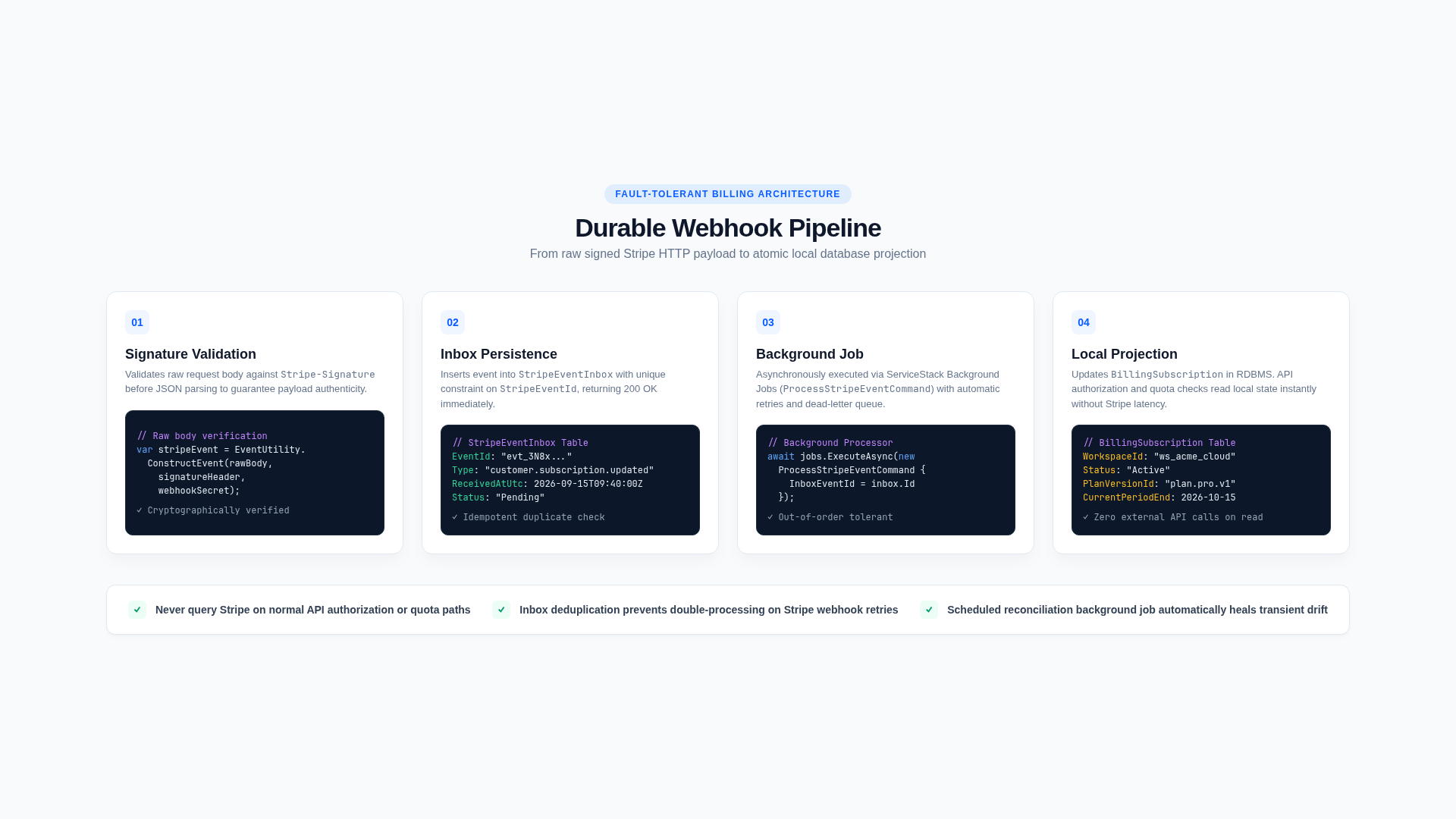
When a payment fails, a configurable grace period gives the customer time to fix it. Afterwards the organization falls back to Free, ReadOnly or Suspended access, depending on how you configure it. A billing change never deletes customer data.
Admins can also create Stripe coupons and promotion codes from the Operations Center. The codes can be percentage or fixed-amount, one-time, repeating or forever, with optional redemption limits and expiry dates.
Plans that never change under your customers
A plan is a set of prices, features, quota allowances and an optional trial. Admins manage plans in the Plan Editor by editing a draft and publishing it. Publishing creates a new immutable version, and every existing subscription stays pinned to the version the customer signed up to. Changing your prices never changes an existing customer's contract.
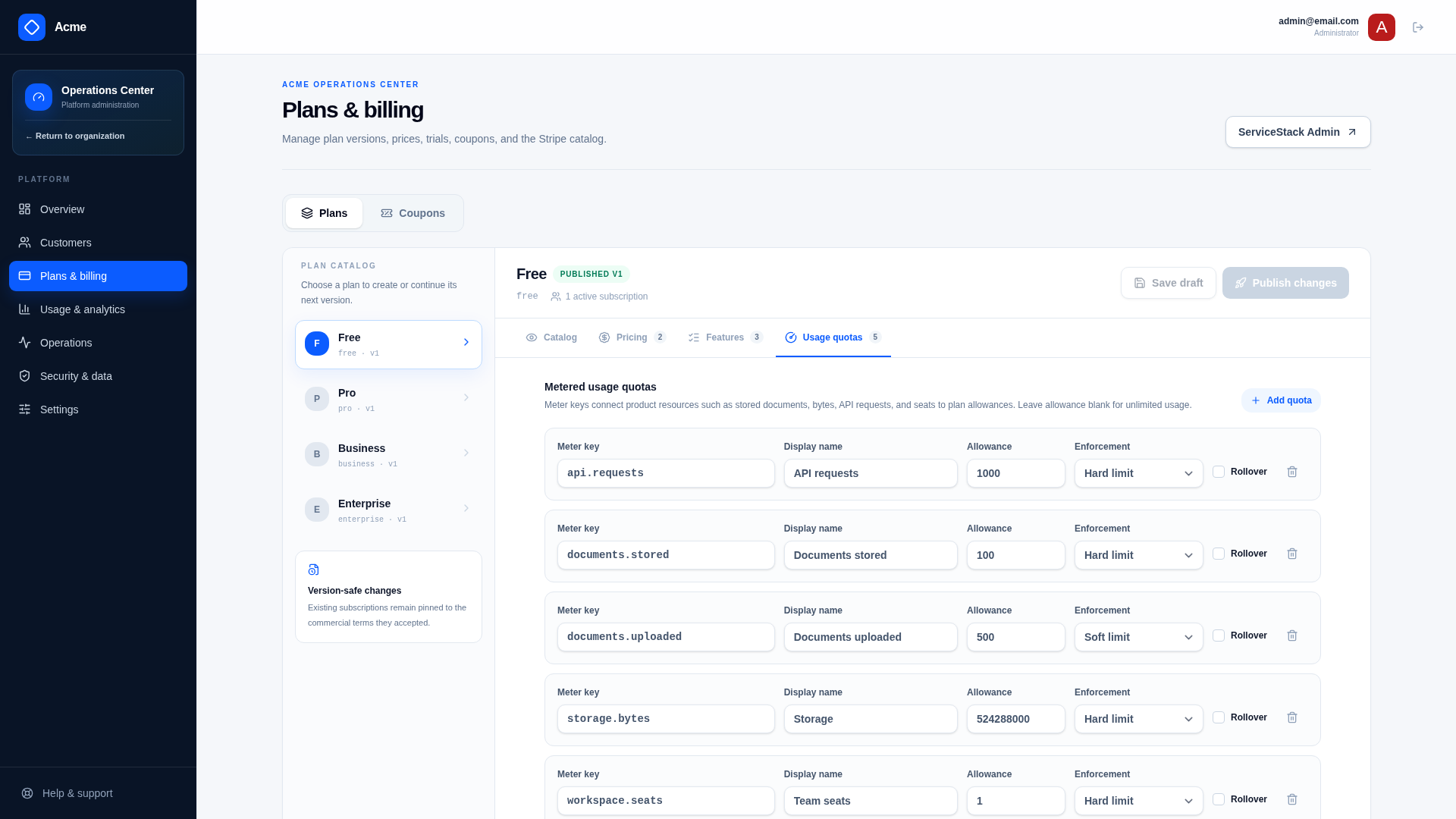
The Plan Editor can also create the matching Products and Prices in Stripe for you. It uses idempotency keys, so running it again won't create duplicates.
Features are declared under Saas.Features in appsettings.json, and plans can only grant features that
are declared there. Protecting an API is a single attribute on its Request DTO:
[ValidateIsAuthenticated]
[RequiresFeature("reports.export")]
[Route("/reports/export", "POST")]
public class ExportReport : IPost, IReturn<ExportReportResponse> { }
The React UI uses the same entitlements to hide controls and suggest upgrades, but the server always has the final say. For negotiated contracts or temporary access, admins can add a per-customer override, with a reason and an optional expiry. Overrides are audited and take priority over the plan.
Usage metering and quotas
Features decide whether an organization can do something, and quotas decide how much. Meters are declared
in appsettings.json and come in two kinds:
- Counters count activity like API requests or reports generated, and reset each billing period
- Gauges track what an organization currently has, like stored documents, bytes or seats
Each plan sets an allowance for each meter, with a Hard limit, Soft limit or Metered overage policy. Usage is checked in your database within a transaction, so two requests can't both use the last remaining unit. Every usage event needs an idempotency key, so a retried request never counts twice:
var usage = manager.RecordUsage(Db, context.Workspace, subscription, context.UserId,
    new RecordUsage {
        MeterKey = "reports.generated",
        Units = 1,
        IdempotencyKey = request.IdempotencyKey,
        MetadataJson = new { reportId }.ToJson(),
    });
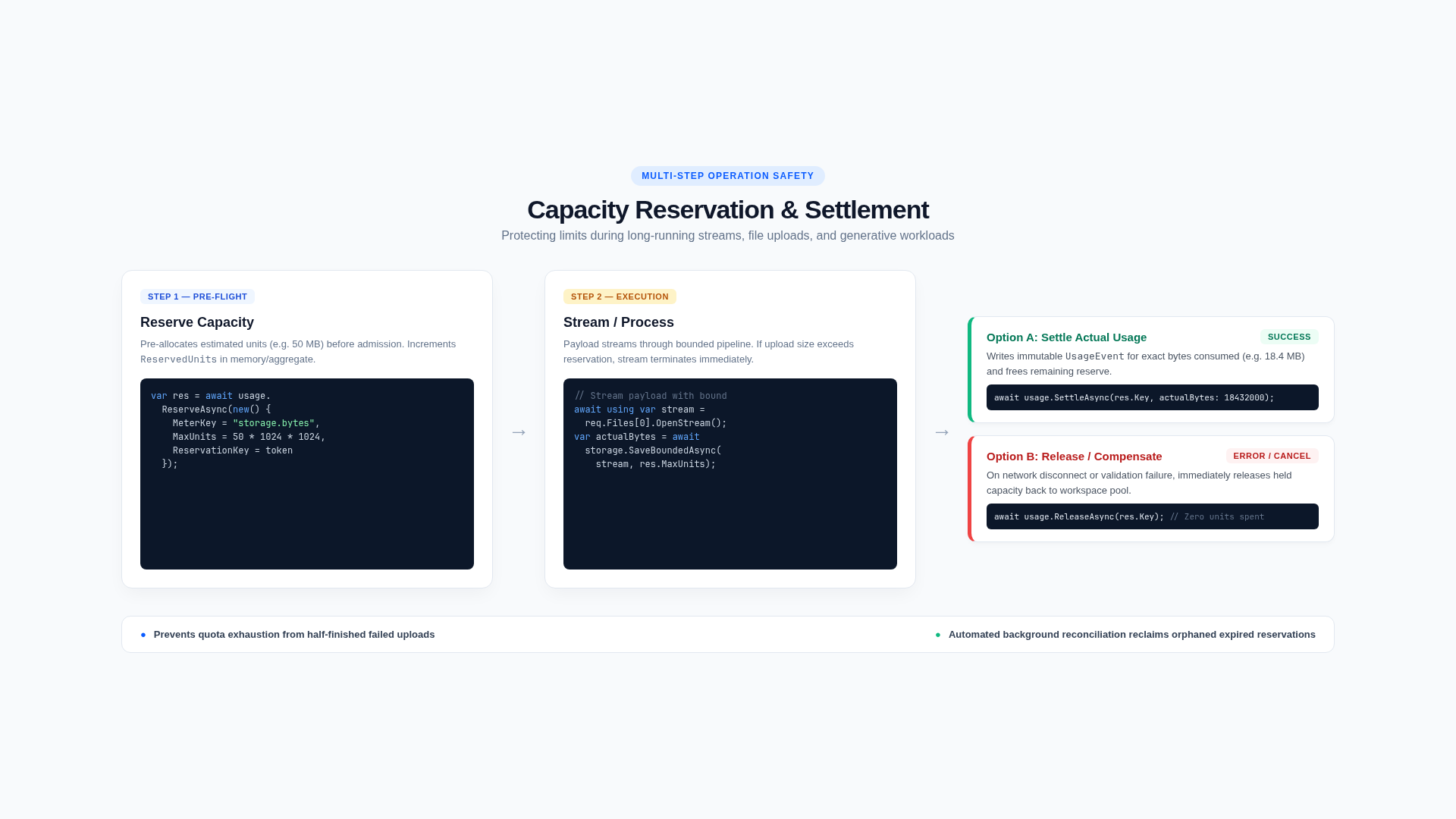
When you don't know the final cost of some work in advance, you reserve capacity before starting it, settle it to the actual amount when it completes, and release it if it fails. Acme's file uploads use this pattern, reserving a document and the expected bytes before streaming the upload. If the upload fails, the reservation is released and any partial file is removed:
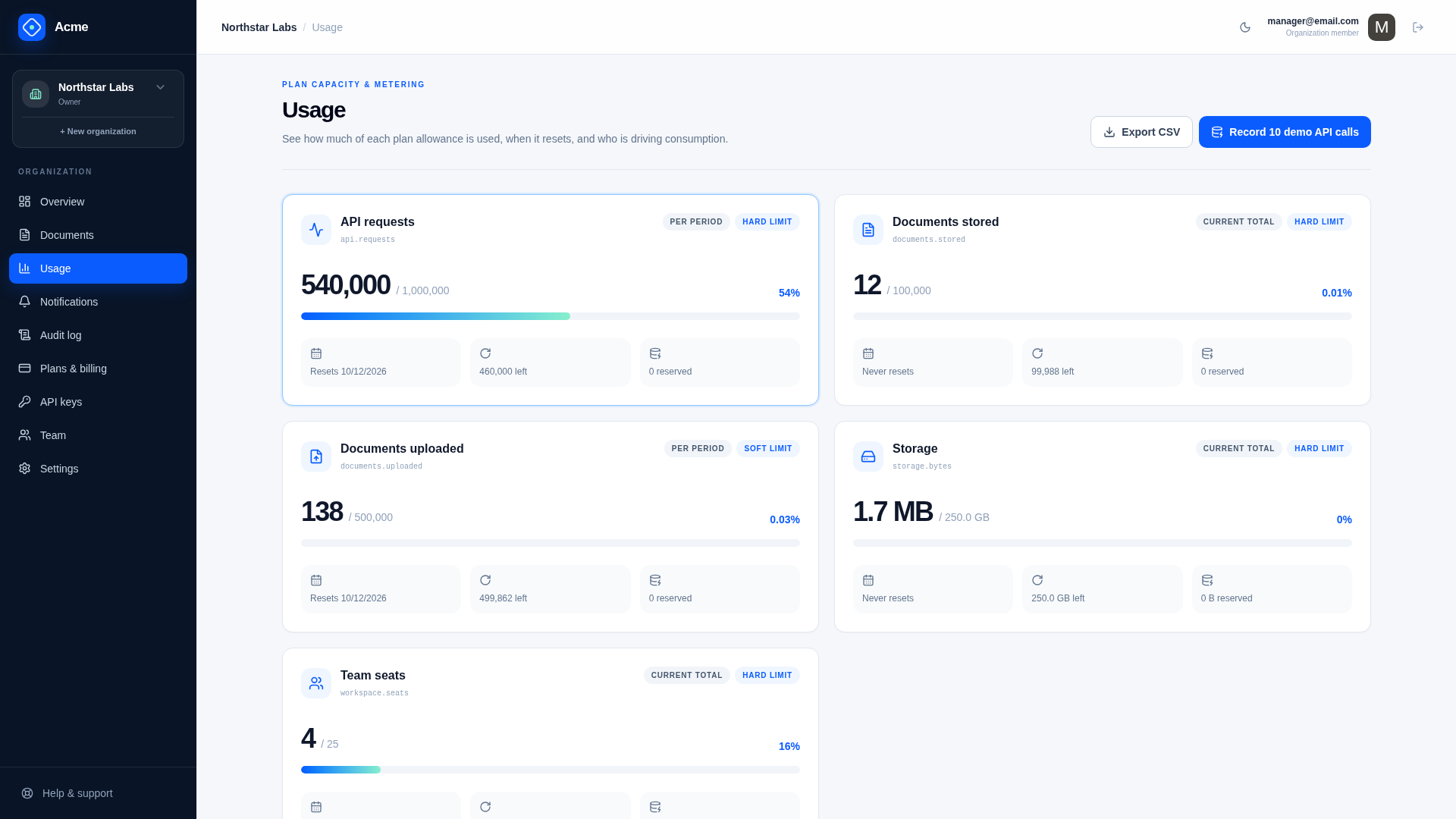
Analytics are built from the same usage events used to enforce quotas, so your dashboards and your limits always agree. Customers see allowances, daily usage, per-member breakdowns, projections and CSV exports on their Usage page. Operators can see plan mix, growth and quota pressure across all customers:
An Operations Center for running the business
The /admin Operations Center is where your team runs the business. It has 3 platform roles of its own,
separate from the roles inside customer organizations: Admin, BillingAdmin and Support:
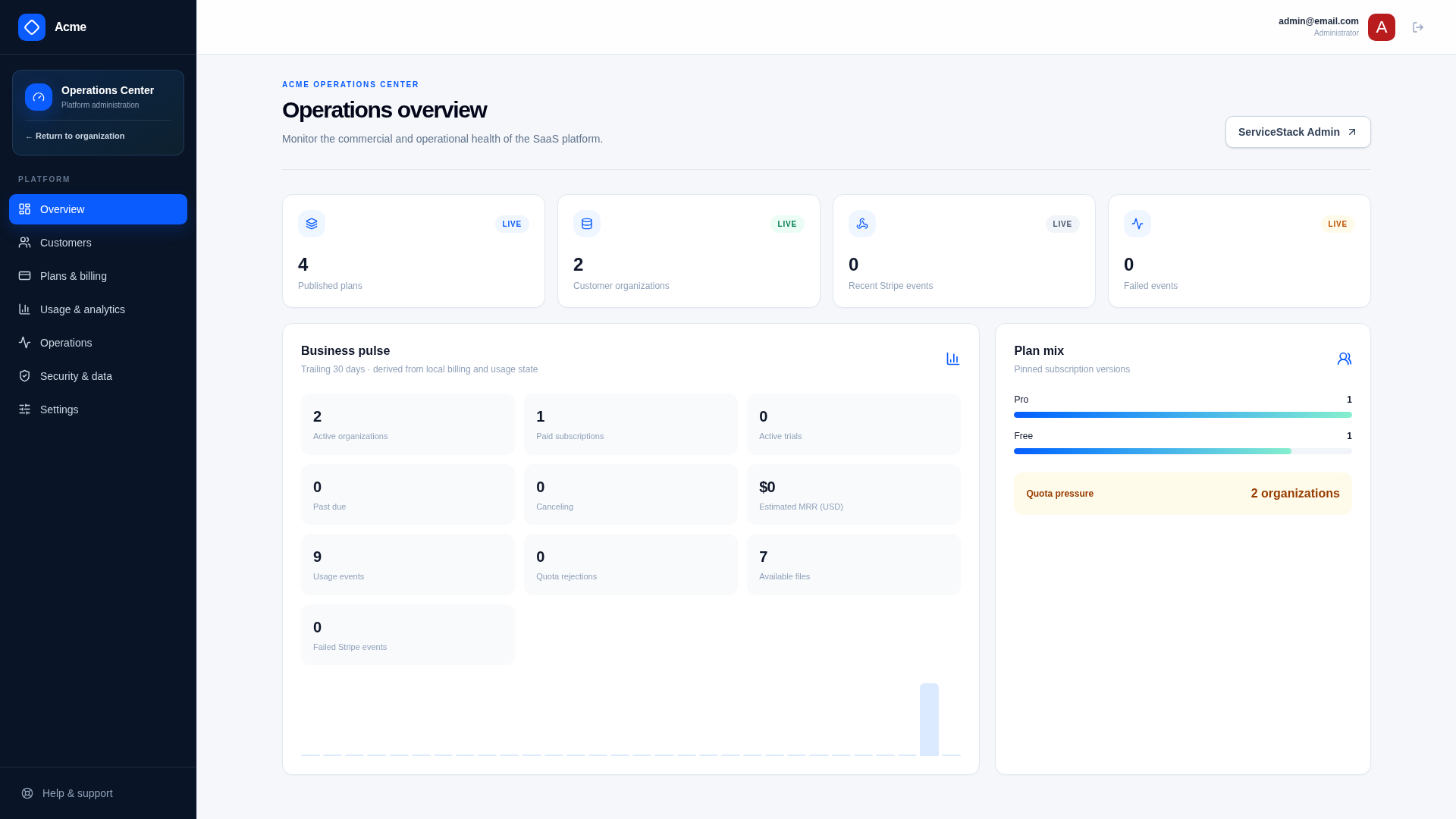
- Customer 360 - search by organization, member email, Stripe ID or API key fingerprint to see a customer's subscription, entitlements, usage, members, audit history and support notes
- Plans & Coupons - edit and publish plan versions, and create Stripe coupons and promotion codes
- Usage - platform-wide analytics, plan mix, growth and quota pressure
- Operations - failed Stripe events, notifications and lifecycle work, with retries that use the original idempotency key, and a check of whether each integration is configured
- Security - retention runs, active support sessions and the platform audit log
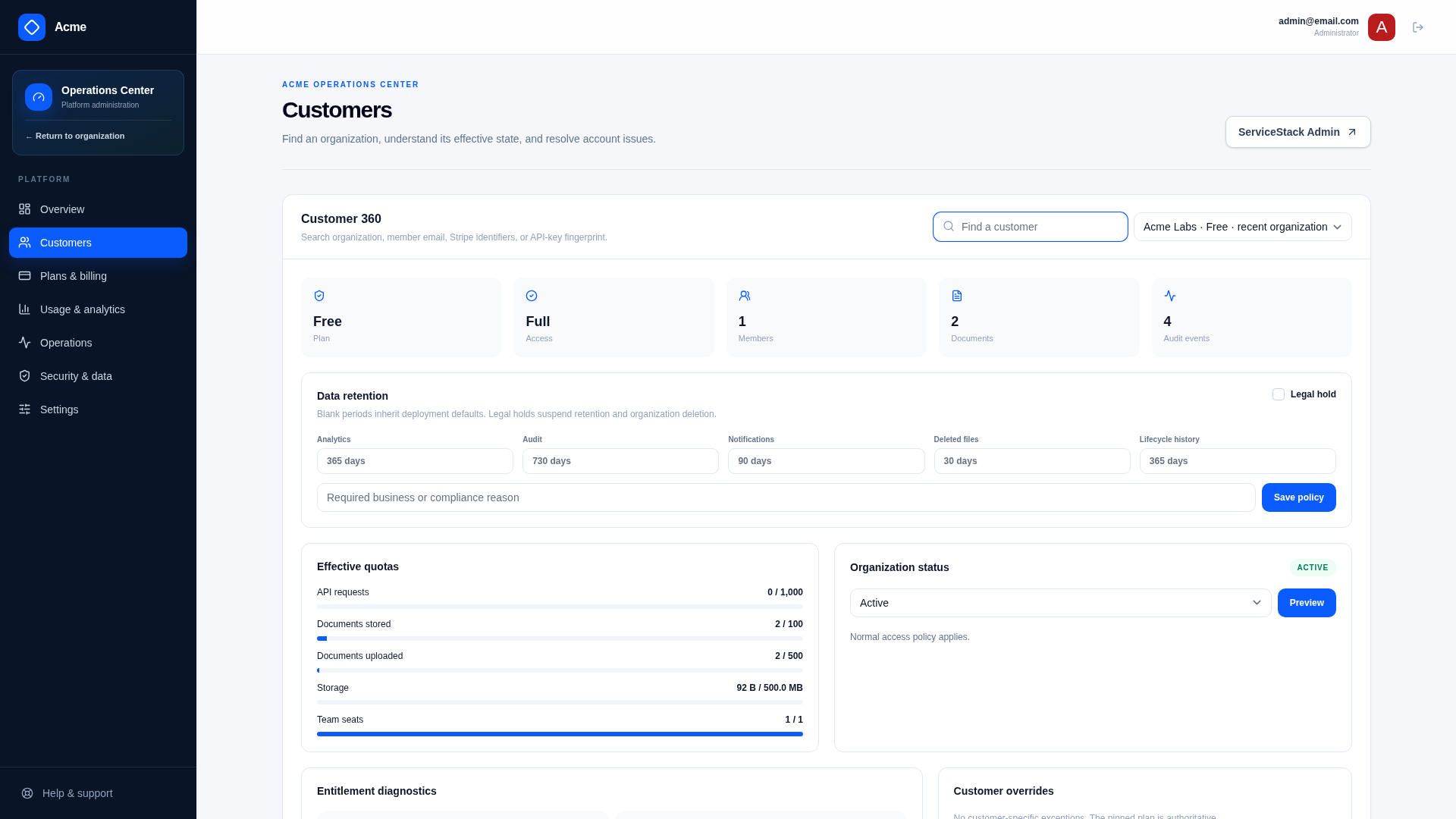
Risky operations like usage adjustments or status changes require a reason. The high-risk ones also show a preview of their impact and ask the operator to type the organization's name to confirm.
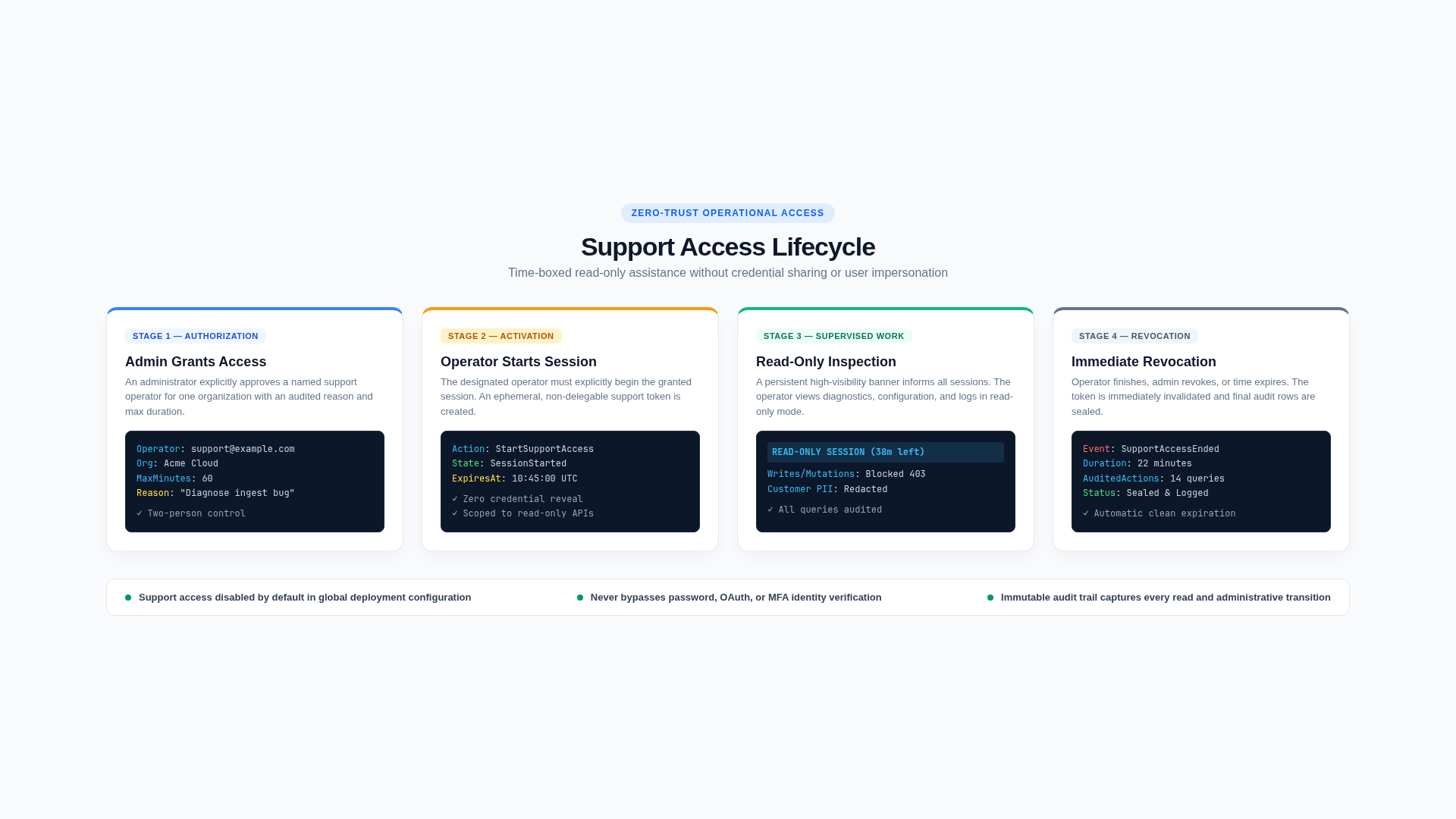
Support access is off by default. When enabled, an Admin grants a named Support operator time-limited, read-only access to a single organization. The operator has to start the session explicitly, sensitive data is hidden from them, and every step is audited:
Lifecycle, audit and notifications
The template also includes the features customers and compliance reviews will ask you for:
- Audit logs - security, billing, lifecycle and admin actions are recorded with the actor, organization and request ID, with passwords, keys and other secrets removed. Customers and operators can both search and export them
- Data export - Owners and Admins can download a ZIP of all their organization's data and files. The export is generated by a background job and expires after a configurable number of days
- Delayed deletion - deleting an organization makes it read-only for a recovery window, during which the Owner can cancel. Legal holds block deletion, and user accounts are kept for their other organizations
- Retention - global defaults for analytics, audit, notification and file retention, which operators can override per organization
- Notifications - in-app and email notifications with per-user preferences. Duplicates are prevented, and failed deliveries are retried and shown in the Operations Center
Durable work with Background Jobs
Anything that's slow, calls an external service, runs later or needs to be retried runs in ServiceStack Background Jobs. This includes Stripe webhook processing, file deletion, export creation, email delivery, subscription reconciliation, retention, usage rollups and delayed organization deletion.
Important work is saved to the database before a job is queued, and jobs only receive record IDs. Each job reloads the current state before acting, so a job queued before a legal hold or membership change still respects it. Recurring jobs release abandoned reservations, rebuild usage rollups, capture daily business metrics and apply retention in bounded batches.
Built for AI-assisted development
The template's clear conventions also make it a good fit for coding agents. AGENTS.md and the docs give an
agent the context it needs. C# DTOs define the API contracts, features.json records which module owns each
table, and ./scripts/verify.sh checks the result. A typical request to an agent can describe a complete
feature:
Add organization-bound widget creation for Owner and Admin members.
Gate it with widgets.basic and enforce a billing-period widgets.created quota.
Use reserve/settle because the provider call can fail, enqueue the provider work with
ServiceStack Background Jobs, generate the TypeScript DTOs, add an AppShell page,
and test cross-tenant access, idempotent replay, exact/over limit, retry, and static build.
Run ./scripts/verify.sh and report the results.
Verify and ship
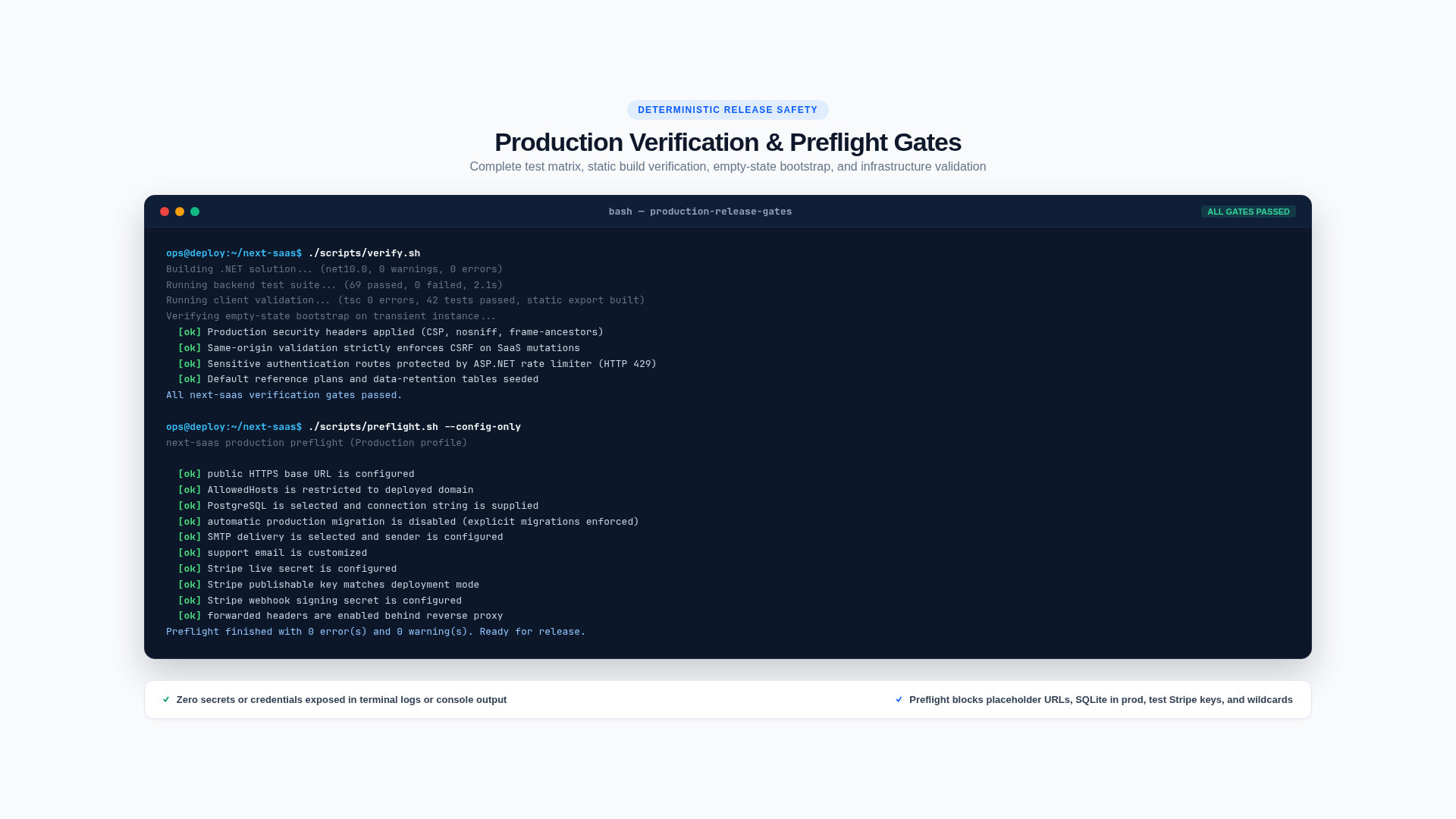
A single command runs everything you need to check before a release:
./scripts/verify.sh
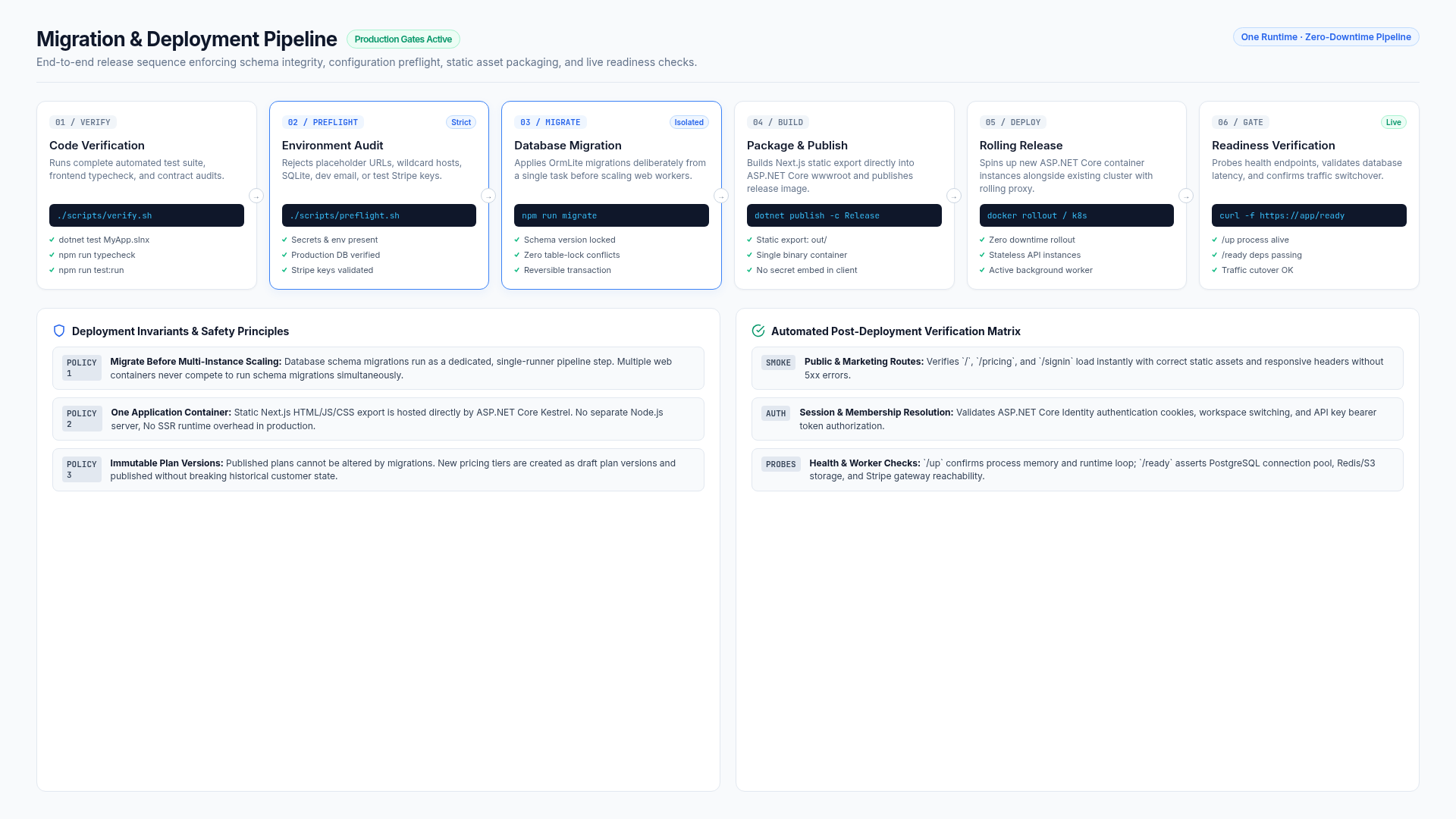
It builds and tests the .NET and TypeScript projects, generates the production static export, and then starts the App in Production against a completely empty database to check that it can create its schema and seed data from scratch.
Before deploying, ./scripts/preflight.sh checks your production configuration without printing any secrets.
In Production, the App also refuses to start with unsafe settings. It lists every missing requirement at once,
like HTTPS, AllowedHosts, a database server, SMTP or Stripe keys.
The included GitHub Actions deploy to any Linux server with Kamal. The workflow
builds and tests each commit, publishes a container image tagged with the commit SHA, runs database
migrations and checks the /ready endpoint before the release is complete. You can start with a
single-server SQLite deployment, then move to PostgreSQL by changing your configuration:
Get Started
Create a new Next SaaS project with:
npx create-net next-saas ProjectName
Then run it locally:
cd ProjectName/MyApp.Client && npm install
cd ../MyApp && npm install
dotnet watch
On first run it creates the database, seeds the Free, Personal, Pro, Business and
Enterprise plans and creates development users. Sign in as admin@email.com to explore the Operations
Center, or as manager@email.com to use the customer App. To fill it with realistic sample organizations,
subscriptions and usage history, run:
./scripts/seed-example-data.sh
The Next SaaS docs walk you through each step, from choosing your database and customizing the product, to adding your first metered feature, connecting a Stripe sandbox and shipping to production. They also include reference guides for every concept, feature, operations runbook and security control in the template.


